Http长轮询数据同步源码分析
Apache ShenYu 是一个异步的,高性能的,跨语言的,响应式的
API网关。
在ShenYu网关中,数据同步是指,当在后台管理系统中,数据发送了更新后,如何将更新的数据同步到网关中。Apache ShenYu 网关当前支持ZooKeeper、WebSocket、Http长轮询、Nacos 、Etcd 和 Consul 进行数据同步。本文的主要内容是基于Http长轮询的数据同步源码分析。
本文基于
shenyu-2.5.0版本进行源码分析,官网的介绍请参考 数据同步原理 。
1. Http长轮询
这里直接引用官网的相关描述:
Zookeeper和WebSocket数据同步的机制比较简单,而Http长轮询则比较复杂。Apache ShenYu借鉴了Apollo、Nacos的设计思想,取其精华,自己实现了Http长轮询数据同步功能。注意,这里并非传统的ajax长轮询!
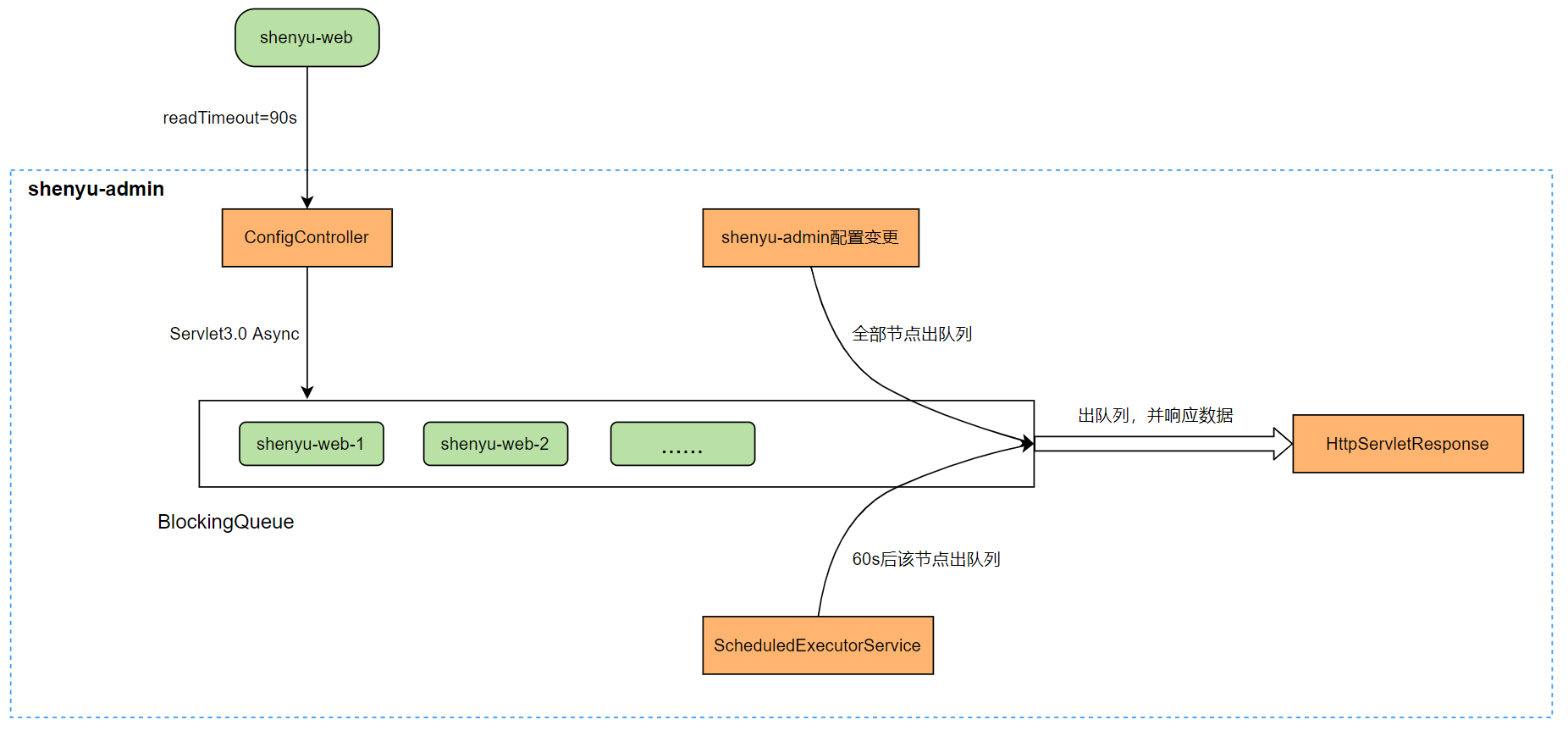
Http长轮询 机制如上所示,Apache ShenYu网关主动请求 shenyu-admin 的配置服务,读取超时时间为 90s,意味着网关层请求配置服务最多会等待 90s,这样便于 shenyu-admin 配置服务及时响应变更数据,从而实现准实时推送。
Http长轮询 机制是由网关主动请求 shenyu-admin ,所以这次的源码分析,我们从网关这一侧开始。
2. 网关数据同步
2.1 加载配置
Http长轮询 数据同步配置的加载是通过spring boot的starter机制,当我们引入相关依赖和在配置文件中有如下配置时,就会加载。
在pom文件中引入依赖:
<!--shenyu data sync start use http-->
<dependency>
    <groupId>org.apache.shenyu</groupId>
    <artifactId>shenyu-spring-boot-starter-sync-data-http</artifactId>
    <version>${project.version}</version>
</dependency>
在application.yml配置文件中添加配置:
shenyu:
    sync:
       http:
          url : http://localhost:9095
当网关启动时,配置类HttpSyncDataConfiguration就会执行,加载相应的Bean。
/**
 * Http sync data configuration for spring boot.
 */
@Configuration
@ConditionalOnClass(HttpSyncDataService.class)
@ConditionalOnProperty(prefix = "shenyu.sync.http", name = "url")
@EnableConfigurationProperties(value = HttpConfig.class)
public class HttpSyncDataConfiguration {

  private static final Logger LOGGER = LoggerFactory.getLogger(HttpSyncDataConfiguration.class);

  /**
   * Rest template.
   * 创建RestTemplate
   * @param httpConfig the http config       http配置
   * @return the rest template
   */
  @Bean
  public RestTemplate restTemplate(final HttpConfig httpConfig) {
    OkHttp3ClientHttpRequestFactory factory = new OkHttp3ClientHttpRequestFactory();
    factory.setConnectTimeout(Objects.isNull(httpConfig.getConnectionTimeout()) ? (int) HttpConstants.CLIENT_POLLING_CONNECT_TIMEOUT : httpConfig.getConnectionTimeout());
    factory.setReadTimeout(Objects.isNull(httpConfig.getReadTimeout()) ? (int) HttpConstants.CLIENT_POLLING_READ_TIMEOUT : httpConfig.getReadTimeout());
    factory.setWriteTimeout(Objects.isNull(httpConfig.getWriteTimeout()) ? (int) HttpConstants.CLIENT_POLLING_WRITE_TIMEOUT : httpConfig.getWriteTimeout());
    return new RestTemplate(factory);
  }

  /**
   * AccessTokenManager.
   * 创建AccessTokenManager,专门用户对admin进行http请求时access token的处理
   * @param httpConfig   the http config.
   * @param restTemplate the rest template.
   * @return the access token manager.
   */
  @Bean
  public AccessTokenManager accessTokenManager(final HttpConfig httpConfig, final RestTemplate restTemplate) {
    return new AccessTokenManager(restTemplate, httpConfig);
  }

  /**
   * Http sync data service.
   * 创建 HttpSyncDataService
   * @param httpConfig         the http config
   * @param pluginSubscriber   the plugin subscriber
   * @param restTemplate       the rest template
   * @param metaSubscribers    the meta subscribers
   * @param authSubscribers    the auth subscribers
   * @param accessTokenManager the access token manager
   * @return the sync data service
   */
  @Bean
  public SyncDataService httpSyncDataService(final ObjectProvider<HttpConfig> httpConfig,
                                             final ObjectProvider<PluginDataSubscriber> pluginSubscriber,
                                             final ObjectProvider<RestTemplate> restTemplate,
                                             final ObjectProvider<List<MetaDataSubscriber>> metaSubscribers,
                                             final ObjectProvider<List<AuthDataSubscriber>> authSubscribers,
                                             final ObjectProvider<AccessTokenManager> accessTokenManager) {
    LOGGER.info("you use http long pull sync shenyu data");
    return new HttpSyncDataService(
            Objects.requireNonNull(httpConfig.getIfAvailable()),
            Objects.requireNonNull(pluginSubscriber.getIfAvailable()),
            Objects.requireNonNull(restTemplate.getIfAvailable()),
            metaSubscribers.getIfAvailable(Collections::emptyList),
            authSubscribers.getIfAvailable(Collections::emptyList),
            Objects.requireNonNull(accessTokenManager.getIfAvailable())
    );
  }
}
HttpSyncDataConfiguration是Http长轮询数据同步的配置类,负责创建HttpSyncDataService(负责http数据同步的具体实现)、RestTemplate和AccessTokenManager (负责与adminhttp调用时access token的处理)。它的注解如下:
@Configuration:表示这是一个配置类;@ConditionalOnClass(HttpSyncDataService.class):条件注解,表示要有HttpSyncDataService这个类;@ConditionalOnProperty(prefix = "shenyu.sync.http", name = "url"):条件注解,要有shenyu.sync.http.url这个属性配置。@EnableConfigurationProperties(value = HttpConfig.class):表示让HttpConfig上的注解@ConfigurationProperties(prefix = "shenyu.sync.http")生效,将HttpConfig这个配置类注入Ioc容器中。
2.2 属性初始化
- HttpSyncDataService
在HttpSyncDataService的构造函数中,完成属性初始化。
public class HttpSyncDataService implements SyncDataService {

    // 省略了属性字段......

    public HttpSyncDataService(final HttpConfig httpConfig,
                               final PluginDataSubscriber pluginDataSubscriber,
                               final RestTemplate restTemplate,
                               final List<MetaDataSubscriber> metaDataSubscribers,
                               final List<AuthDataSubscriber> authDataSubscribers,
                               final AccessTokenManager accessTokenManager) {
          // 1.设置accessTokenManager
          this.accessTokenManager = accessTokenManager;
          // 2.创建数据处理器
          this.factory = new DataRefreshFactory(pluginDataSubscriber, metaDataSubscribers, authDataSubscribers);
          // 3.shenyu-admin的url, 多个用逗号(,)分割
          this.serverList = Lists.newArrayList(Splitter.on(",").split(httpConfig.getUrl()));
          // 4.只用于http长轮询的restTemplate
          this.restTemplate = restTemplate;
          // 5.开始执行长轮询任务
          this.start();
    }

    //......
}
上面代码中省略了其他函数和相关字段,在构造函数中完成属性的初始化,主要是:
-
设置
accessTokenManager,定时向admin请求更新accessToken的值。然后每次向admin发起请求时都必须将header的X-Access-Token属性设置成accessToken对应的值; -
创建数据处理器,用于后续缓存各种类型的数据(插件、选择器、规则、元数据和认证数据);
-
获取
admin属性配置,主要是获取admin的url,admin有可能是集群,多个用逗号(,)分割; -
设置
RestTemplate,用于向admin发起请求; -
开始执行长轮询任务。
2.3 开始长轮询
- HttpSyncDataService#start()
在start()方法中,干了两件事情,一个是获取全量数据,即请求admin端获取所有需要同步的数据,然后将获取到的数据缓存到网关内存中。另一个是开启多线程执行长轮询任务。
public class HttpSyncDataService implements SyncDataService {

    // ......

    private void start() {
      // // 只初始化一次,通过原子类实现。
      if (RUNNING.compareAndSet(false, true)) {
        // 初次启动,获取全量数据
        this.fetchGroupConfig(ConfigGroupEnum.values());
        // 一个后台服务,一个线程
        int threadSize = serverList.size();
        // 自定义线程池
        this.executor = new ThreadPoolExecutor(threadSize, threadSize, 60L, TimeUnit.SECONDS,
                new LinkedBlockingQueue<>(),
                ShenyuThreadFactory.create("http-long-polling", true));
        // 开始长轮询,一个admin服务,创建一个线程用于数据同步
        this.serverList.forEach(server -> this.executor.execute(new HttpLongPollingTask(server)));
      } else {
        LOG.info("shenyu http long polling was started, executor=[{}]", executor);
      }
    }

    // ......
}
2.3.1 获取全量数据
- HttpSyncDataService#fetchGroupConfig()
ShenYu将所有需要同步的数据进行了分组,一共有5种数据类型,分别是插件、选择器、规则、元数据和认证数据。
public enum ConfigGroupEnum {
    APP_AUTH, // 认证数据
    PLUGIN, //插件
    RULE, // 规则
    SELECTOR, // 选择器
    META_DATA; // 元数据
}
admin有可能是集群,这里通过循环的方式向每个admin发起请求,有一个执行成功了,那么向admin获取全量数据并缓存到网关的操作就执行成功。如果出现了异常,就向下一个admin发起请求。
public class HttpSyncDataService implements SyncDataService {

  // ......

  private void fetchGroupConfig(final ConfigGroupEnum... groups) throws ShenyuException {
    // admin有可能是集群,这里通过循环的方式向每个admin发起请求
    for (int index = 0; index < this.serverList.size(); index++) {
      String server = serverList.get(index);
      try {
        // 真正去执行
        this.doFetchGroupConfig(server, groups);
        // 有一个成功,就成功了,可以退出循环
        break;
      } catch (ShenyuException e) {
        // 出现异常,尝试执行下一个
        // 最后一个也执行失败了,抛出异常
        if (index >= serverList.size() - 1) {
          throw e;
        }
        LOG.warn("fetch config fail, try another one: {}", serverList.get(index + 1));
      }
    }
  }

  // ......
}
- HttpSyncDataService#doFetchGroupConfig()
在此方法中,首先拼装请求参数,然后通过httpClient发起请求,到admin中获取数据,最后将获取到的数据更新到网关内存中。
public class HttpSyncDataService implements SyncDataService {
  private void doFetchGroupConfig(final String server, final ConfigGroupEnum... groups) {
    // 1. 拼请求参数,所有分组枚举类型
    StringBuilder params = new StringBuilder();
    for (ConfigGroupEnum groupKey : groups) {
      params.append("groupKeys").append("=").append(groupKey.name()).append("&");
    }
    // admin端提供的接口  /configs/fetch
    String url = server + Constants.SHENYU_ADMIN_PATH_CONFIGS_FETCH + "?" + StringUtils.removeEnd(params.toString(), "&");
    LOG.info("request configs: [{}]", url);
    String json;
    try {
      HttpHeaders headers = new HttpHeaders();
      // 设置accessToken
      headers.set(Constants.X_ACCESS_TOKEN, this.accessTokenManager.getAccessToken());
      HttpEntity<String> httpEntity = new HttpEntity<>(headers);
      // 2. 发起请求,获取变更数据
      json = this.restTemplate.exchange(url, HttpMethod.GET, httpEntity, String.class).getBody();
    } catch (RestClientException e) {
      String message = String.format("fetch config fail from server[%s], %s", url, e.getMessage());
      LOG.warn(message);
      throw new ShenyuException(message, e);
    }
    // 3. 更新网关内存中数据
    boolean updated = this.updateCacheWithJson(json);
    if (updated) {
      LOG.debug("get latest configs: [{}]", json);
      return;
    }
    // 更新成功,此方法就执行完成了
    LOG.info("The config of the server[{}] has not been updated or is out of date. Wait for 30s to listen for changes again.", server);
    // 服务端没有数据更新,就等30s
    ThreadUtils.sleep(TimeUnit.SECONDS, 30);
  }
}
从代码中,可以看到 admin端提供的获取全量数据接口是 /configs/fetch,这里先不进一步深入,放在后文再分析。
获取到admin返回结果数据,并成功更新,那么此方法就执行结束了。如果没有更新成功,那么有可能是服务端没有数据更新,就等待30s。
这里需要提前说明一下,网关在判断是否更新成功时,有比对数据的操作,马上就会提到。
- HttpSyncDataService#updateCacheWithJson()
更新网关内存中的数据。使用GSON进行反序列化,从属性data中拿真正的数据,然后交给DataRefreshFactory去做更新。
    private boolean updateCacheWithJson(final String json) {
        // 使用GSON进行反序列化
        JsonObject jsonObject = GSON.fromJson(json, JsonObject.class);
        // if the config cache will be updated?
        return factory.executor(jsonObject.getAsJsonObject("data"));
    }
- DataRefreshFactory#executor()
根据不同数据类型去更新数据,返回更新结果。具体更新逻辑交给了dataRefresh.refresh()方法。在更新结果中,有一种数据类型进行了更新,就表示此次操作发生了更新。
    public boolean executor(final JsonObject data) {
        //并行更新数据
        List<Boolean> result = ENUM_MAP.values().parallelStream()
                .map(dataRefresh -> dataRefresh.refresh(data))
                .collect(Collectors.toList());
        //有一个更新就表示此次发生了更新操作
        return result.stream().anyMatch(Boolean.TRUE::equals);
    }
- AbstractDataRefresh#refresh()
数据更新逻辑采用的是模板方法设计模式,通用操作在抽象方法中完成,不同的实现逻辑由子类完成。5种数据类型具体的更新逻辑有些差异,但是也存在通用的更新逻辑,类图关系如下:
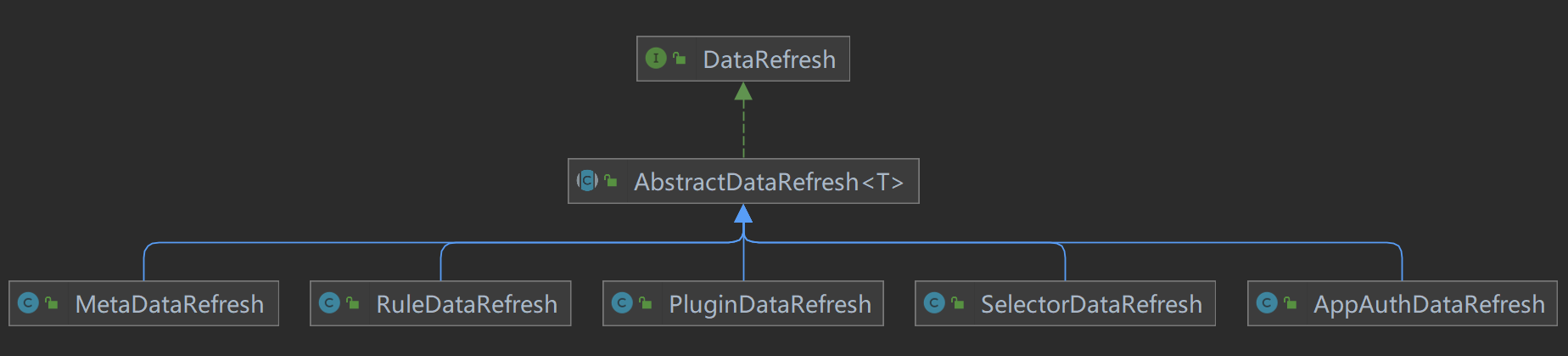
在通用的refresh()方法中,负责数据类型转换,判断是否需要更新,和实际的数据刷新操作。
public abstract class AbstractDataRefresh<T> implements DataRefresh {

  // ......

  @Override
  public Boolean refresh(final JsonObject data) {
    // 数据类型转换
    JsonObject jsonObject = convert(data);
    if (Objects.isNull(jsonObject)) {
      return false;
    }

    boolean updated = false;
    // 得到数据类型
    ConfigData<T> result = fromJson(jsonObject);
    // 是否需要更新
    if (this.updateCacheIfNeed(result)) {
      updated = true;
      // 真正的更新逻辑,数据刷新操作
      refresh(result.getData());
    }

    return updated;
  }

  // ......
}
- AbstractDataRefresh#updateCacheIfNeed()
数据转换的过程,就是根据不同的数据类型进行转换,我们就不再进一步追踪了,看看数据是否需要更新的逻辑。方法名是updateCacheIfNeed(),通过方法重载实现。
public abstract class AbstractDataRefresh<T> implements DataRefresh {

  // ......

  // result是数据
  protected abstract boolean updateCacheIfNeed(ConfigData<T> result);

  // newVal是获取到的最新的值
  // groupEnum 是哪种数据类型
  protected boolean updateCacheIfNeed(final ConfigData<T> newVal, final ConfigGroupEnum groupEnum) {
    // 如果是第一次,那么直接放到cache中,返回 true,表示此次进行了更新
    if (GROUP_CACHE.putIfAbsent(groupEnum, newVal) == null) {
      return true;
    }
    ResultHolder holder = new ResultHolder(false);
    GROUP_CACHE.merge(groupEnum, newVal, (oldVal, value) -> {
      // md5 值相同,不需要更新
      if (StringUtils.equals(oldVal.getMd5(), newVal.getMd5())) {
        LOG.info("Get the same config, the [{}] config cache will not be updated, md5:{}", groupEnum, oldVal.getMd5());
        return oldVal;
      }

      // 当前缓存的数据修改时间大于 新来的数据,不需要更新
      // must compare the last update time
      if (oldVal.getLastModifyTime() >= newVal.getLastModifyTime()) {
        LOG.info("Last update time earlier than the current configuration, the [{}] config cache will not be updated", groupEnum);
        return oldVal;
      }
      LOG.info("update {} config: {}", groupEnum, newVal);
      holder.result = true;
      return newVal;
    });
    return holder.result;
  }

  // ......
}
从上面的源码中可以看到,有两种情况不需要更新:
- 两个的数据的
md5值相同,不需要更新; - 当前缓存的数据修改时间大于 新来的数据,不需要更新。
其他情况需要更新数据。
分析到这里,就将start() 方法中初次启动,获取全量数据的逻辑分析完了,接下来是长轮询的操作。为了方便,我将start()方法再粘贴一次:
public class HttpSyncDataService implements SyncDataService {

  // ......

  private void start() {
    // // 只初始化一次,通过原子类实现。
    if (RUNNING.compareAndSet(false, true)) {
      // 初次启动,获取全量数据
      this.fetchGroupConfig(ConfigGroupEnum.values());
      // 一个后台服务,一个线程
      int threadSize = serverList.size();
      // 自定义线程池
      this.executor = new ThreadPoolExecutor(threadSize, threadSize, 60L, TimeUnit.SECONDS,
              new LinkedBlockingQueue<>(),
              ShenyuThreadFactory.create("http-long-polling", true));
      // 开始长轮询,一个admin服务,创建一个线程用于数据同步
      this.serverList.forEach(server -> this.executor.execute(new HttpLongPollingTask(server)));
    } else {
      LOG.info("shenyu http long polling was started, executor=[{}]", executor);
    }
  }

  // ......
}
2.3.2 执行长轮询任务
- HttpLongPollingTask#run()
长轮询任务是HttpLongPollingTask,它实现了Runnable接口,任务逻辑在run()方法中。通过while()循环实现不断执行任务,即长轮询。在每一次的轮询中有三次重试逻辑,一次轮询任务失败了,等 5s 再继续,3 次都失败了,等5 分钟再试。
开始长轮询,一个admin服务,创建一个线程用于数据同步。
class HttpLongPollingTask implements Runnable {

  private final String server;

  HttpLongPollingTask(final String server) {
    this.server = server;
  }

  @Override
  public void run() {
    // 一直轮询
    while (RUNNING.get()) {
      // 默认重试 3 次
      int retryTimes = 3;
      for (int time = 1; time <= retryTimes; time++) {
        try {
          doLongPolling(server);
        } catch (Exception e) {
          if (time < retryTimes) {
            LOG.warn("Long polling failed, tried {} times, {} times left, will be suspended for a while! {}",
                    time, retryTimes - time, e.getMessage());
            // 长轮询失败了,等 5s 再继续
            ThreadUtils.sleep(TimeUnit.SECONDS, 5);
            continue;
          }
          LOG.error("Long polling failed, try again after 5 minutes!", e);
          // 3 次都失败了,等 5 分钟再试
          ThreadUtils.sleep(TimeUnit.MINUTES, 5);
        }
      }
    }
    LOG.warn("Stop http long polling.");
  }
}
- HttpSyncDataService#doLongPolling()
执行长轮询任务的核心逻辑:
- 根据数据类型组装请求参数:
md5和lastModifyTime; - 组装请求头和请求体;
- 向
admin发起请求,判断组数据是否发生变更; - 根据发生变更的组,再去获取数据。
public class HttpSyncDataService implements SyncDataService {
  private void doLongPolling(final String server) {
    // 组装请求参数:md5 和 lastModifyTime
    MultiValueMap<String, String> params = new LinkedMultiValueMap<>(8);
    for (ConfigGroupEnum group : ConfigGroupEnum.values()) {
      ConfigData<?> cacheConfig = factory.cacheConfigData(group);
      if (cacheConfig != null) {
        String value = String.join(",", cacheConfig.getMd5(), String.valueOf(cacheConfig.getLastModifyTime()));
        params.put(group.name(), Lists.newArrayList(value));
      }
    }
    // 组装请求头和请求体
    HttpHeaders headers = new HttpHeaders();
    headers.setContentType(MediaType.APPLICATION_FORM_URLENCODED);
    // 设置accessToken
    headers.set(Constants.X_ACCESS_TOKEN, this.accessTokenManager.getAccessToken());
    HttpEntity<MultiValueMap<String, String>> httpEntity = new HttpEntity<>(params, headers);
    String listenerUrl = server + Constants.SHENYU_ADMIN_PATH_CONFIGS_LISTENER;

    JsonArray groupJson;
    //向admin发起请求,判断组数据是否发生变更
    //这里只是判断了某个组是否发生变更
    try {
      String json = this.restTemplate.postForEntity(listenerUrl, httpEntity, String.class).getBody();
      LOG.info("listener result: [{}]", json);
      JsonObject responseFromServer = GsonUtils.getGson().fromJson(json, JsonObject.class);
      groupJson = responseFromServer.getAsJsonArray("data");
    } catch (RestClientException e) {
      String message = String.format("listener configs fail, server:[%s], %s", server, e.getMessage());
      throw new ShenyuException(message, e);
    }
    // 根据发生变更的组,再去获取数据
    /**
     * 官网对此处的解释:
     * 网关收到响应信息之后,只知道是哪个 Group 发生了配置变更,还需要再次请求该 Group 的配置数据。
     * 这里可能会存在一个疑问:为什么不是直接将变更的数据写出?
     * 我们在开发的时候,也深入讨论过该问题,因为 http 长轮询机制只能保证准实时,如果在网关层处理不及时,
     * 或者管理员频繁更新配置,很有可能便错过了某个配置变更的推送,安全起见,我们只告知某个 Group 信息发生了变更。
     *
     * 个人理解:
     * 如果将变更数据直接写出,当管理员频繁更新配置时,第一次更新了,将client移除阻塞队列,返回响应信息给网关。
     * 如果这个时候进行了第二次更新,那么当前的client是不在阻塞队列中,所以这一次的变更就会错过。
     * 网关层处理不及时,也是同理。
     * 这是一个长轮询,一个网关一个同步线程,可能存在耗时的过程。
     * 如果admin有数据变更,当前网关client是没有在阻塞队列中,就不到数据。
     */
    if (Objects.nonNull(groupJson) && groupJson.size() > 0) {
      // fetch group configuration async.
      ConfigGroupEnum[] changedGroups = GsonUtils.getGson().fromJson(groupJson, ConfigGroupEnum[].class);
      LOG.info("Group config changed: {}", Arrays.toString(changedGroups));
      this.doFetchGroupConfig(server, changedGroups);
    }
  }
}
这里需要特别解释一点的是:在长轮询任务中,为什么不直接拿到变更的数据?而是先判断哪个分组数据发生了变更,然后再次请求admin,获取变更数据?
官网对此处的解释是:
网关收到响应信息之后,只知道是哪个 Group 发生了配置变更,还需要再次请求该 Group 的配置数据。 这里可能会存在一个疑问:为什么不是直接将变更的数据写出? 我们在开发的时候,也深入讨论过该问题,因为
http长轮询机制只能保证准实时,如果在网关层处理不及时, 或者管理员频繁更新配置,很有可能便错过了某个配置变更的推送,安全起见,我们只告知某个 Group 信息发生了变更。
个人理解是:
如果将变更数据直接写出,管理员频繁更新配置时,第一次更新了,将
client移除阻塞队列,返回响应信息给网关。如果这个时候进行了第二次更新,那么当前的client是不在阻塞队列中,所以这一次的变更就会错过。网关层处理不及时,也是同理。 这是一个长轮询,一个网关一个同步线程,可能存在耗时的过程。如果admin有数据变更,当前网关client是没有在阻塞队列中,就会更新不到数据。
我们还没有分析到admin端的处理逻辑,先大概说一下。在admin端,会将网关client放到阻塞队列,有数据变更,网关client就会出队列,发送变更数据。所以,如果有数据变更时,网关client不在阻塞队列,那么就无法得到当前变更的数据。
知道哪个分组数据发生变更时,主动再向admin获取变更的数据,根据分组不同,全量拿数据。调用方法是doFetchGroupConfig(),这个在前面已经分析过了。
分析到这里,网关端的数据同步操作就完成了。长轮询任务就是不断向admin发起请求,看看数据是否发生变更,如果有分组数据发生变更,那么就再主动向admin发起请求,获取变更数据,然后更新网关内存中的数据。
网关端长轮询任务流程:

3. admin数据同步
从前面分析的过程中,可以看到,网关端主要调用admin的两个接口:
/configs/listener:判断组数据是否发生变更;/configs/fetch:获取变更组数据。
直接从这两个接口分析的话,可能有的地方不好理解,所以我们还是从admin启动流程开始分析数据同步过程。
3.1 加载配置
如果在配置文件application.yml中,进行了如下配置,就表示通过http长轮询的方式进行数据同步。
shenyu:
  sync:
      http:
        enabled: true
程序启动时,通过springboot条件装配实现数据同步类的配置加载。在这个过程中,会创建HttpLongPollingDataChangedListener,负责处理长轮询的相关实现逻辑。
/**
 * 数据同步配置类
 * 通过springboot条件装配实现
 * The type Data sync configuration.
 */
@Configuration
public class DataSyncConfiguration {

    /**
     * http长轮询
     * http long polling.
     */
    @Configuration
    @ConditionalOnProperty(name = "shenyu.sync.http.enabled", havingValue = "true")
    @EnableConfigurationProperties(HttpSyncProperties.class)
    static class HttpLongPollingListener {

        @Bean
        @ConditionalOnMissingBean(HttpLongPollingDataChangedListener.class)
        public HttpLongPollingDataChangedListener httpLongPollingDataChangedListener(final HttpSyncProperties httpSyncProperties) {
            return new HttpLongPollingDataChangedListener(httpSyncProperties);
        }
    }
}
3.2 数据变更监听器实例化
- HttpLongPollingDataChangedListener
数据变更监听器通过构造函数的方式完成实例化和初始化操作。在构造函数中会创建阻塞队列,用于存放客户端;创建线程池,用于执行延迟任务,周期任务;保存长轮询相关属性信息。
    public HttpLongPollingDataChangedListener(final HttpSyncProperties httpSyncProperties) {
        // 默认客户端(这里是网关)1024个
        this.clients = new ArrayBlockingQueue<>(1024);
        // 创建线程池
        // ScheduledThreadPoolExecutor 可以执行延迟任务,周期任务,普通任务
        this.scheduler = new ScheduledThreadPoolExecutor(1,
                ShenyuThreadFactory.create("long-polling", true));
        // 长轮询的属性信息
        this.httpSyncProperties = httpSyncProperties;
    }
另外,它的类图关系如下:

实现了InitializingBean接口,所以在bean的初始化过程中执行afterInitialize()方法。通过线程池执行周期任务:更新内存中(CACHE)的数据每隔5分钟执行一次,5分钟后开始执行。刷新本地缓存就是从数据库读取数据到本地缓存(这里就是内存),通过refreshLocalCache()完成。
public class HttpLongPollingDataChangedListener extends AbstractDataChangedListener {

  // ......

  /**
   * 在 InitializingBean接口中的afterPropertiesSet()方法中被调用,即在bean的初始化过程中执行
   */
  @Override
  protected void afterInitialize() {
    long syncInterval = httpSyncProperties.getRefreshInterval().toMillis();
    // 执行周期任务:更新内存中(CACHE)的数据每隔5分钟执行一次,5分钟后开始执行
    // 防止admin先启动一段时间后,产生了数据;然后网关初次连接时,没有拿到全量数据
    scheduler.scheduleWithFixedDelay(() -> {
      LOG.info("http sync strategy refresh config start.");
      try {
        // 从数据库读取数据到本地缓存(这里就是内存)
        this.refreshLocalCache();
        LOG.info("http sync strategy refresh config success.");
      } catch (Exception e) {
        LOG.error("http sync strategy refresh config error!", e);
      }
    }, syncInterval, syncInterval, TimeUnit.MILLISECONDS);
    LOG.info("http sync strategy refresh interval: {}ms", syncInterval);
  }

  // ......
}
- refreshLocalCache()
分别对5种数据类型进行更新。
public abstract class AbstractDataChangedListener implements DataChangedListener, InitializingBean {

  // ......

  // 从数据库读取数据到本地缓存(这里就是内存)
  private void refreshLocalCache() {
    //更新认证数据
    this.updateAppAuthCache();
    //更新插件数据
    this.updatePluginCache();
    //更新规则数据
    this.updateRuleCache();
    //更新选择器数据
    this.updateSelectorCache();
    //更新元数据
    this.updateMetaDataCache();
  }

  // ......
}
5个更新方法的逻辑是类似的,调用service方法获取数据,然后放到内存CACHE中。以更新规则数据方法updateRuleCache()为例,传入规则枚举类型,调用ruleService.listAll()从数据库获取所有规则数据。
    /**
     * Update rule cache.
     */
    protected void updateRuleCache() {
        this.updateCache(ConfigGroupEnum.RULE, ruleService.listAll());
    }
- updateCache()
使用数据库中的数据更新内存中的数据。
public abstract class AbstractDataChangedListener implements DataChangedListener, InitializingBean {

  // ......

  // 缓存数据的 Map
  protected static final ConcurrentMap<String, ConfigDataCache> CACHE = new ConcurrentHashMap<>();

  /**
   * if md5 is not the same as the original, then update lcoal cache.
   * 更新缓存中的数据
   * @param group ConfigGroupEnum
   * @param <T> the type of class
   * @param data the new config data
   */
  protected <T> void updateCache(final ConfigGroupEnum group, final List<T> data) {
    //数据序列化
    String json = GsonUtils.getInstance().toJson(data);
    //传入md5值和修改时间
    ConfigDataCache newVal = new ConfigDataCache(group.name(), json, Md5Utils.md5(json), System.currentTimeMillis());
    //更新分组数据
    ConfigDataCache oldVal = CACHE.put(newVal.getGroup(), newVal);
    LOG.info("update config cache[{}], old: {}, updated: {}", group, oldVal, newVal);
  }

  // ......
}
初始化的过程就是启动周期性任务,定时从数据库获取数据更新内存数据。
接下来开始对两个接口开始分析:
/configs/listener:判断组数据是否发生变更;/configs/fetch:获取变更组数据。
3.3 数据变更轮询接口
/configs/listener:判断组数据是否发生变更;
接口类是ConfigController,只有使用http长轮询进行数据同步时才会生效。接口方法listener()没有其他逻辑,直接调用doLongPolling()方法。
/**
 * This Controller only when HttpLongPollingDataChangedListener exist, will take effect.
 */
@ConditionalOnBean(HttpLongPollingDataChangedListener.class)
@RestController
@RequestMapping("/configs")
public class ConfigController {

    private final HttpLongPollingDataChangedListener longPollingListener;

    public ConfigController(final HttpLongPollingDataChangedListener longPollingListener) {
      this.longPollingListener = longPollingListener;
    }

    // 省略其他逻辑

    /**
     * Listener.
     * 监听数据变更,执行长轮询
     * @param request  the request
     * @param response the response
     */
    @PostMapping(value = "/listener")
    public void listener(final HttpServletRequest request, final HttpServletResponse response) {
        longPollingListener.doLongPolling(request, response);
    }

}
- HttpLongPollingDataChangedListener#doLongPolling()
执行长轮询任务:如果有数据变更,将会立即响应给客户端(这里就是网关端)。否则,客户端会一直被阻塞,直到有数据变更或者超时。
public class HttpLongPollingDataChangedListener extends AbstractDataChangedListener {

  // ......

  /**
   * 执行长轮询:如果有数据变更,会立即响应给客户端(这里就是网关端)。
   * 否则,否则客户端会一直被阻塞,直到有数据变更或者超时。
   * @param request
   * @param response
   */
  public void doLongPolling(final HttpServletRequest request, final HttpServletResponse response) {
    // compare group md5
    // 比较md5,判断网关的数据和admin端的数据是否一致,得到发生变更的数据组
    List<ConfigGroupEnum> changedGroup = compareChangedGroup(request);
    String clientIp = getRemoteIp(request);
    // response immediately.
    // 有变更的数据,则立即向网关响应
    if (CollectionUtils.isNotEmpty(changedGroup)) {
      this.generateResponse(response, changedGroup);
      Log.info("send response with the changed group, ip={}, group={}", clientIp, changedGroup);
      return;
    }

    // 没有变更,则将客户端(这里就是网关)放进阻塞队列
    final AsyncContext asyncContext = request.startAsync();
    asyncContext.setTimeout(0L);
    scheduler.execute(new LongPollingClient(asyncContext, clientIp, HttpConstants.SERVER_MAX_HOLD_TIMEOUT));
  }

  // ......
}
- HttpLongPollingDataChangedListener#compareChangedGroup()
判断组数据是否发生变更,判断逻辑是比较网关端和admin端的md5值和lastModifyTime。
- 如果
md5值不一样,那么需要更新; - 如果
admin端的lastModifyTime大于网关端的lastModifyTime,那么需要更新。
 /**
     * 判断组数据是否发生变更
     * @param request
     * @return
     */
    private List<ConfigGroupEnum> compareChangedGroup(final HttpServletRequest request) {
        List<ConfigGroupEnum> changedGroup = new ArrayList<>(ConfigGroupEnum.values().length);
        for (ConfigGroupEnum group : ConfigGroupEnum.values()) {
            // 网关端数据的md5值和lastModifyTime
            String[] params = StringUtils.split(request.getParameter(group.name()), ',');
            if (params == null || params.length != 2) {
                throw new ShenyuException("group param invalid:" + request.getParameter(group.name()));
            }
            String clientMd5 = params[0];
            long clientModifyTime = NumberUtils.toLong(params[1]);
            ConfigDataCache serverCache = CACHE.get(group.name());
            // do check. 判断组数据是否发生变更
            if (this.checkCacheDelayAndUpdate(serverCache, clientMd5, clientModifyTime)) {
                changedGroup.add(group);
            }
        }
        return changedGroup;
    }
- LongPollingClient
没有变更数据,则将客户端(这里就是网关)放进阻塞队列。阻塞时间是60秒,即60秒后移除,并响应客户端。
class LongPollingClient implements Runnable {
      // 省略了其他逻辑

        @Override
        public void run() {
            try {
                // 先设置定时任务:60秒后移除,并响应客户端
                this.asyncTimeoutFuture = scheduler.schedule(() -> {
                    clients.remove(LongPollingClient.this);
                    List<ConfigGroupEnum> changedGroups = compareChangedGroup((HttpServletRequest) asyncContext.getRequest());
                    sendResponse(changedGroups);
                }, timeoutTime, TimeUnit.MILLISECONDS);

                // 添加到阻塞队列
                clients.add(this);

            } catch (Exception ex) {
                log.error("add long polling client error", ex);
            }
        }

        /**
         * Send response.
         *
         * @param changedGroups the changed groups
         */
        void sendResponse(final List<ConfigGroupEnum> changedGroups) {
            // cancel scheduler
            if (null != asyncTimeoutFuture) {
                asyncTimeoutFuture.cancel(false);
            }
            // 响应变更的组
            generateResponse((HttpServletResponse) asyncContext.getResponse(), changedGroups);
            asyncContext.complete();
        }
    }
3.4 获取变更数据接口
/configs/fetch:获取变更数据;
根据网关传入的参数,获取分组数据,返回结果。主要实现方法是longPollingListener.fetchConfig()。
@ConditionalOnBean(HttpLongPollingDataChangedListener.class)
@RestController
@RequestMapping("/configs")
public class ConfigController {

    private final HttpLongPollingDataChangedListener longPollingListener;

    public ConfigController(final HttpLongPollingDataChangedListener longPollingListener) {
      this.longPollingListener = longPollingListener;
    }

    /**
     * Fetch configs shenyu result.
     * 全量获取分组数据
     * @param groupKeys the group keys
     * @return the shenyu result
     */
    @GetMapping("/fetch")
    public ShenyuAdminResult fetchConfigs(@NotNull final String[] groupKeys) {
        Map<String, ConfigData<?>> result = Maps.newHashMap();
        for (String groupKey : groupKeys) {
            ConfigData<?> data = longPollingListener.fetchConfig(ConfigGroupEnum.valueOf(groupKey));
            result.put(groupKey, data);
        }
        return ShenyuAdminResult.success(ShenyuResultMessage.SUCCESS, result);
    }

  // 省略了其他接口

}
- AbstractDataChangedListener#fetchConfig()
数据获取直接从CACHE中拿,然后根据不同分组类型进行匹配,封装。
public abstract class AbstractDataChangedListener implements DataChangedListener, InitializingBean {
  /**
   * fetch configuration from cache.
   * 获取分组下的全量数据
   * @param groupKey the group key
   * @return the configuration data
   */
  public ConfigData<?> fetchConfig(final ConfigGroupEnum groupKey) {
    // 直接从 CACHE 中拿数据
    ConfigDataCache config = CACHE.get(groupKey.name());
    switch (groupKey) {
      case APP_AUTH: // 认证数据
        return buildConfigData(config, AppAuthData.class);
      case PLUGIN: // 插件数据
        return buildConfigData(config, PluginData.class);
      case RULE:   // 规则数据
        return buildConfigData(config, RuleData.class);
      case SELECTOR:  // 选择器数据
        return buildConfigData(config, SelectorData.class);
      case META_DATA: // 元数据
        return buildConfigData(config, MetaData.class);
      default:  // 其他类型,抛出异常
        throw new IllegalStateException("Unexpected groupKey: " + groupKey);
    }
  }
}
3.5 数据变更
在之前的websocket数据同步和zookeeper数据同步源码分析文章中,我们知道admin端数据同步设计结构如下:
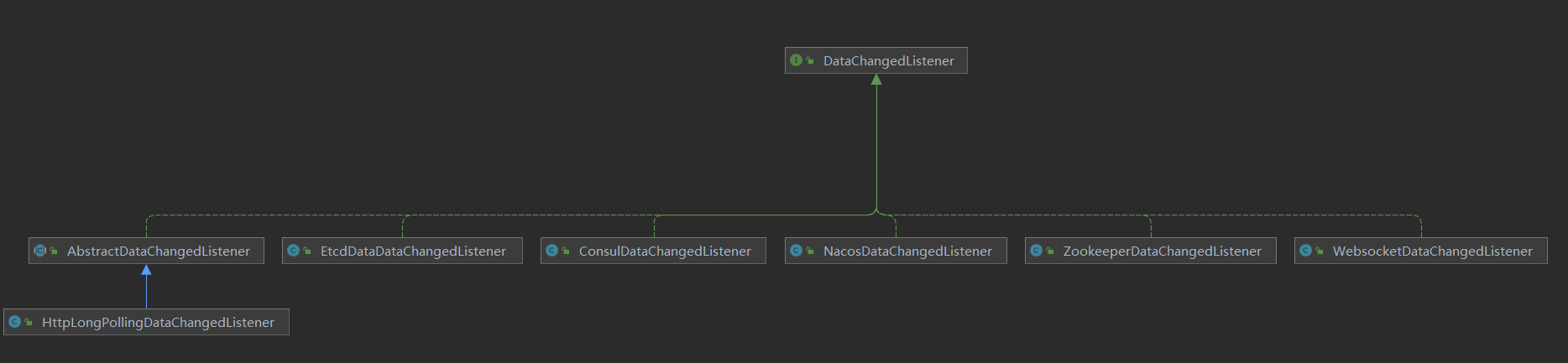
各种数据变更监听器都是DataChangedListener的子类。
当在admin端修改数据后,通过Spring的事件处理机制,发送事件通知。发送逻辑如下:
/**
 * Event forwarders, which forward the changed events to each ConfigEventListener.
 * 数据变更事件分发器:当admin端有数据发生变更时,将变更数据同步到 ShenYu 网关
 * 数据变更依赖于Spring的事件监听机制:ApplicationEventPublisher --> ApplicationEvent --> ApplicationListener
 *
 */
@Component
public class DataChangedEventDispatcher implements ApplicationListener<DataChangedEvent>, InitializingBean {

   //省略了其他逻辑

    /**
     * 有数据变更时,调用此方法
     * @param event
     */
    @Override
    @SuppressWarnings("unchecked")
    public void onApplicationEvent(final DataChangedEvent event) {
        // 遍历数据变更监听器(一般使用一种数据同步的方式就好了)
        for (DataChangedListener listener : listeners) {
            // 哪种数据发生变更
            switch (event.getGroupKey()) {
                case APP_AUTH: // 认证信息
                    listener.onAppAuthChanged((List<AppAuthData>) event.getSource(), event.getEventType());
                    break;
                case PLUGIN:  // 插件信息
                    listener.onPluginChanged((List<PluginData>) event.getSource(), event.getEventType());
                    break;
                case RULE:    // 规则信息
                    listener.onRuleChanged((List<RuleData>) event.getSource(), event.getEventType());
                    break;
                case SELECTOR:   // 选择器信息
                    listener.onSelectorChanged((List<SelectorData>) event.getSource(), event.getEventType());
                    // 当选择器数据更新时,更新API文档信息
                    applicationContext.getBean(LoadServiceDocEntry.class).loadDocOnSelectorChanged((List<SelectorData>) event.getSource(), event.getEventType());
                    break;
                case META_DATA:  // 元数据
                    listener.onMetaDataChanged((List<MetaData>) event.getSource(), event.getEventType());
                    break;
                default:  // 其他类型,抛出异常
                    throw new IllegalStateException("Unexpected value: " + event.getGroupKey());
            }
        }
    }
}
假设,对插件信息进行了修改,通过http长轮询的方式进行数据同步,那么listener.onPluginChanged()的实际调用的是org.apache.shenyu.admin.listener.AbstractDataChangedListener#onPluginChanged:
    /**
     * 在admin的操作,有插件发生了更新
     * @param changed   the changed
     * @param eventType the event type
     */
    @Override
    public void onPluginChanged(final List<PluginData> changed, final DataEventTypeEnum eventType) {
        if (CollectionUtils.isEmpty(changed)) {
            return;
        }
        // 更新内存CACHE
        this.updatePluginCache();
        // 执行变更任务
        this.afterPluginChanged(changed, eventType);
    }
有两个处理操作,一是更新内存CACHE,这个在前面分析过了;另一个是执行变更任务,在线程池中执行。
- HttpLongPollingDataChangedListener#afterPluginChanged()
    @Override
    protected void afterPluginChanged(final List<PluginData> changed, final DataEventTypeEnum eventType) {
        // 在线程池中执行
        scheduler.execute(new DataChangeTask(ConfigGroupEnum.PLUGIN));
    }
- DataChangeTask
数据变更任务:将阻塞队列中的客户端依次移除,并发送响应,通知网关有组数据发生变更。
class DataChangeTask implements Runnable {
		//省略了其他逻辑
        @Override
        public void run() {
            // 阻塞队列中的客户端超过了给定的值100,则分批执行
            if (clients.size() > httpSyncProperties.getNotifyBatchSize()) {
                List<LongPollingClient> targetClients = new ArrayList<>(clients.size());
                clients.drainTo(targetClients);
                List<List<LongPollingClient>> partitionClients = Lists.partition(targetClients, httpSyncProperties.getNotifyBatchSize());
               // 分批执行
                partitionClients.forEach(item -> scheduler.execute(() -> doRun(item)));
            } else {
                // 执行任务
                doRun(clients);
            }
        }

        private void doRun(final Collection<LongPollingClient> clients) {
            // 通知所有客户端发生了数据变更
            for (Iterator<LongPollingClient> iter = clients.iterator(); iter.hasNext();) {
                LongPollingClient client = iter.next();
                iter.remove();
                // 发送响应
                client.sendResponse(Collections.singletonList(groupKey));
                LOG.info("send response with the changed group,ip={}, group={}, changeTime={}", client.ip, groupKey, changeTime);
            }
        }
    }
至此,admin端数据同步逻辑就分析完了。在基于http长轮询数据同步是,它主要有三个功能:
- 提供数据变更监听接口;
- 提供获取变更数据接口;
- 有数据变更时,移除阻塞队列中的客户端,并响应结果。
最后,用三张图描述下admin端长轮询任务流程:
/configs/listener数据变更监听接口:
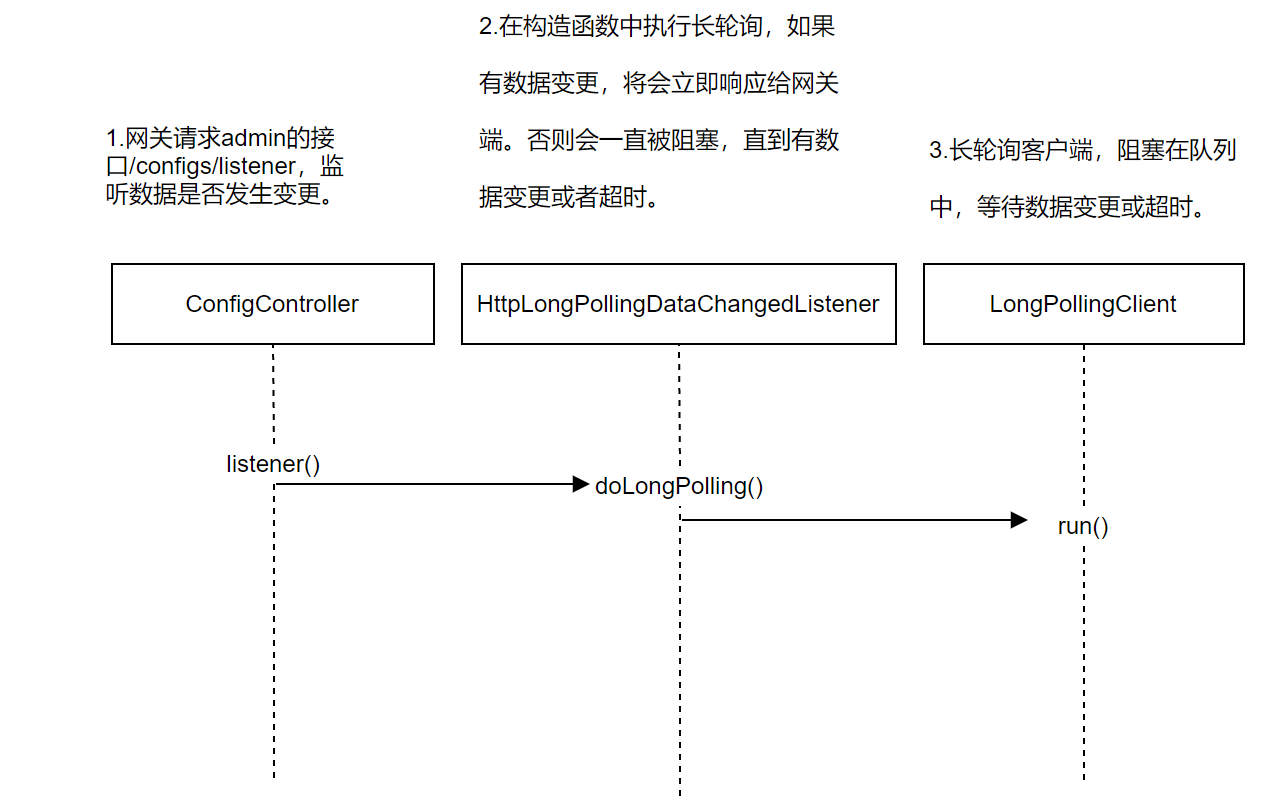
/configs/fetch获取变更数据接口:

- 在admin后台管理系统更新数据,进行数据同步:
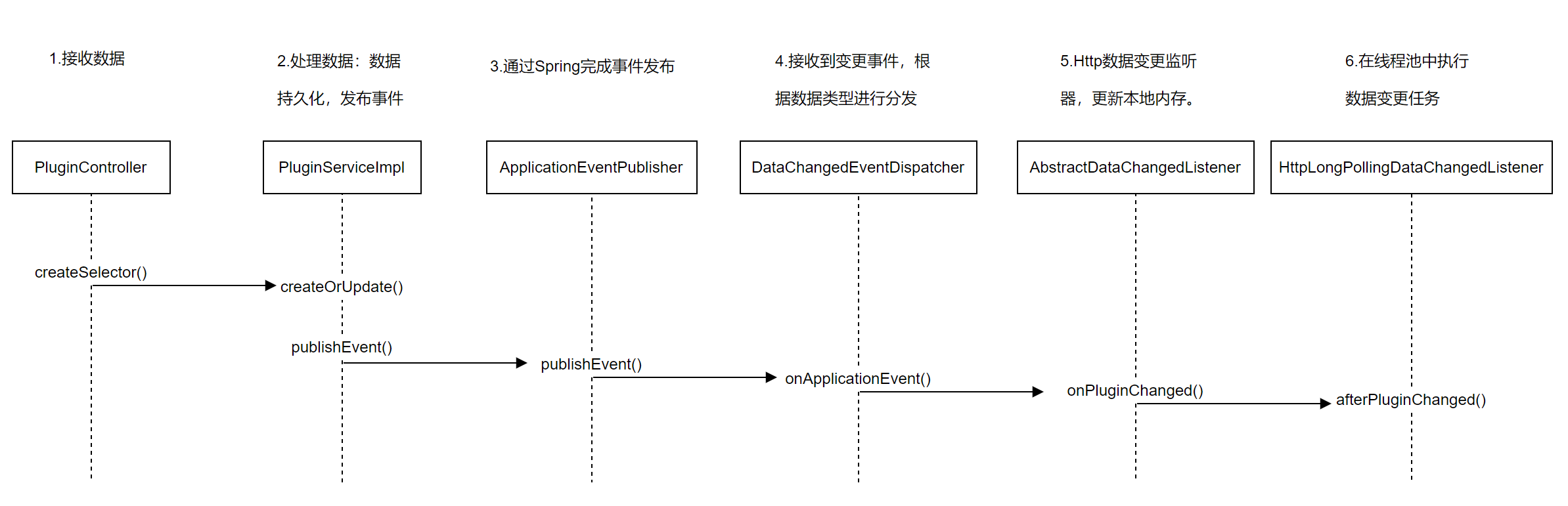
4. 总结
本文主要对ShenYu网关中的http长轮询数据同步进行了源码分析。涉及到的主要知识点如下:
http长轮询由网关端主动发起请求,不断请求admin端;- 变更数据以组为粒度(认证信息、插件、选择器、规则、元数据);
http长轮询结果只拿到了变更组,还需要再次发起请求获取组数据;- 数据是否更新由
md5值和修改时间lastModifyTime决定。