1. Overview
1.1 Plugin Name
- Sign Plugin
1.2 Appropriate Scenario
- Support http header to authorize
- Support http header and request body to authorize
1.3 Plugin functionality
- Process signature authentication of requests.
1.4 Plugin code
-
Core Module:
shenyu-plugin-sign -
Core Class:
org.apache.shenyu.plugin.sign.SignPlugin
1.5 Added Since Which shenyu version
- Since ShenYu 2.4.0
2. How to use plugin
2.1 Plugin-use procedure chart
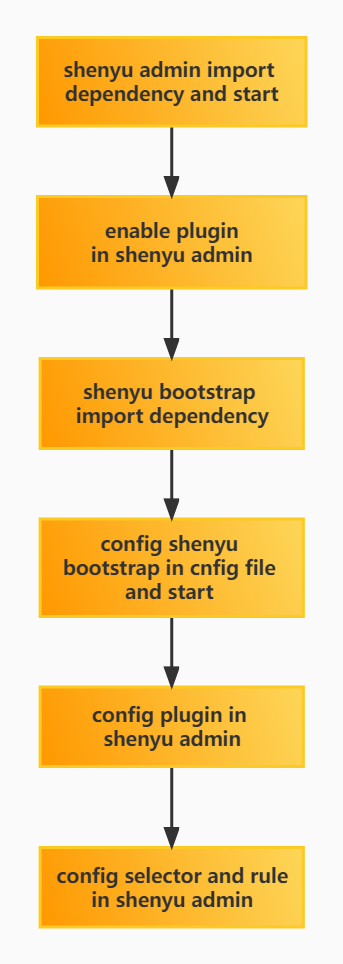
2.2 Import pom
- Introducing
signdependency in thepom.xmlfile of the gateway
<!-- apache shenyu sign plugin start-->
<dependency>
  <groupId>org.apache.shenyu</groupId>
  <artifactId>shenyu-spring-boot-starter-plugin-sign</artifactId>
  <version>${project.version}</version>
</dependency>
<!-- apache shenyu sign plugin end-->
2.3 Enable plugin
- In
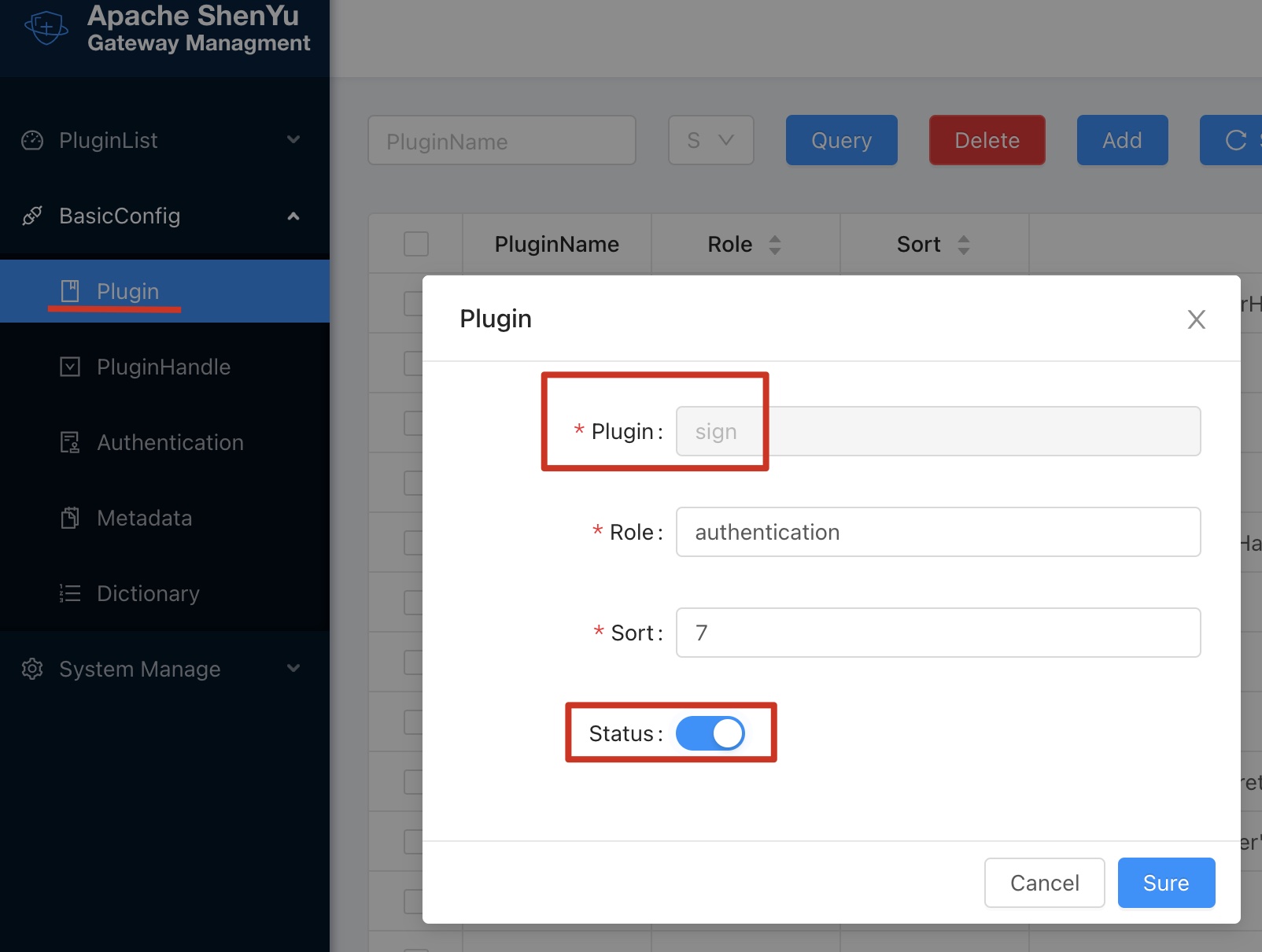
shenyu-admin--> BasicConfig --> Plugin -->signset to enable.
2.4 Config Plugin With Authorize(1.0.0)
2.4.1 AK/SK Config
2.4.1.1 Explanation
- Manage and control the permissions of requests passing through the Apache ShenYu gateway.
- Generate
AK/SKand use it with theSignplugin to achieve precise authority control based on URI level.
2.4.1.2 Tutorial
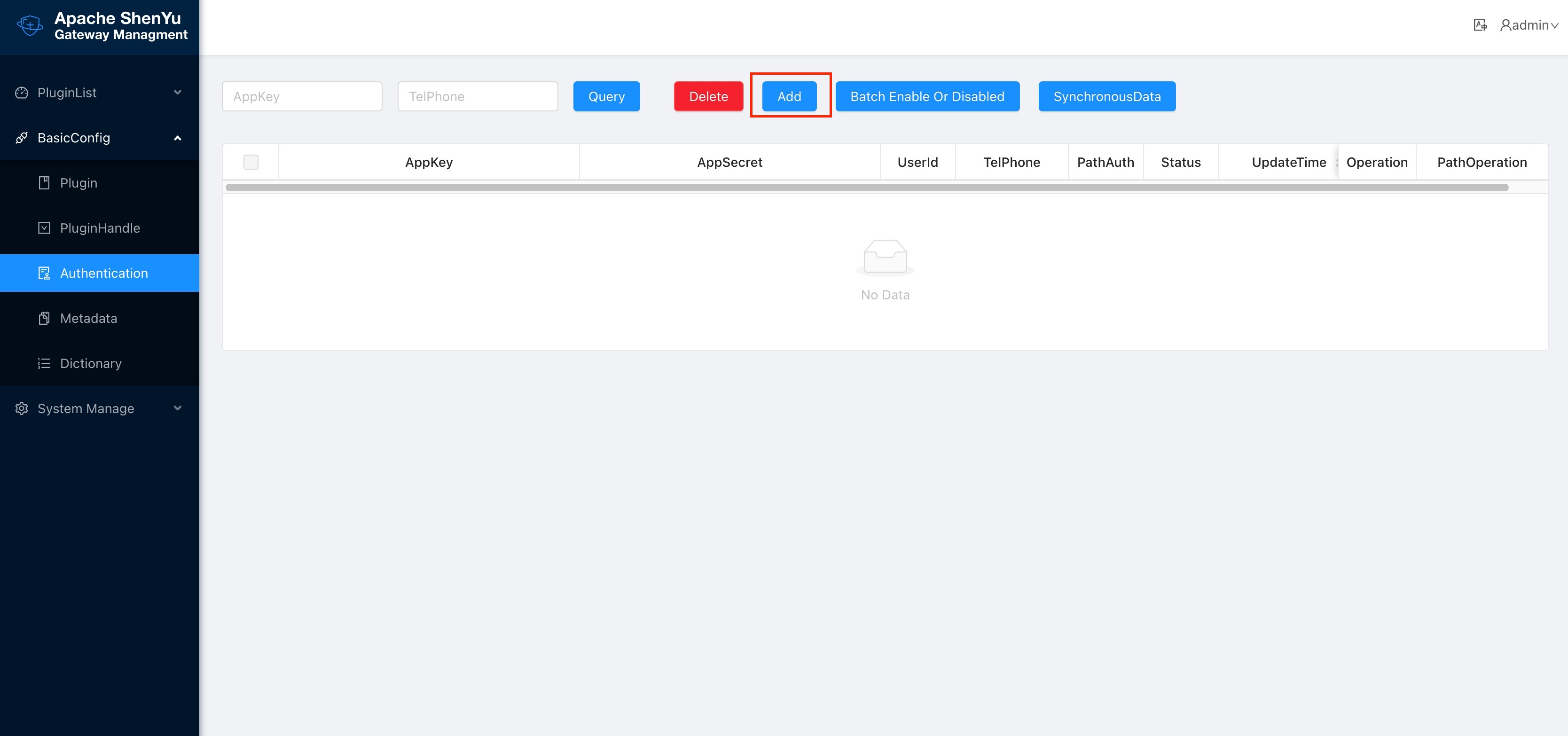
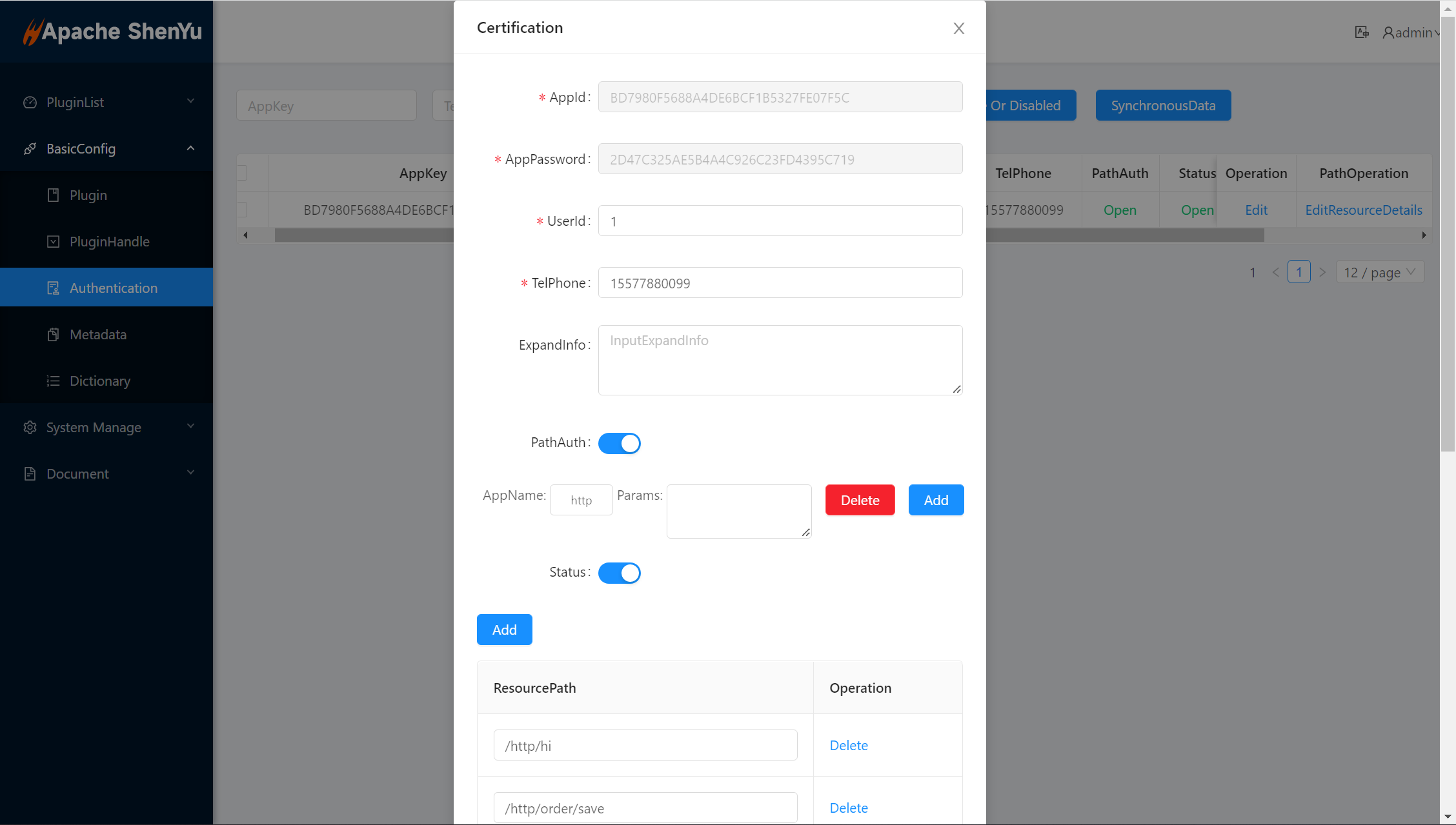
First, we can add a piece of authentication information in BasicConfig - Authentication
Then configure this authentication information
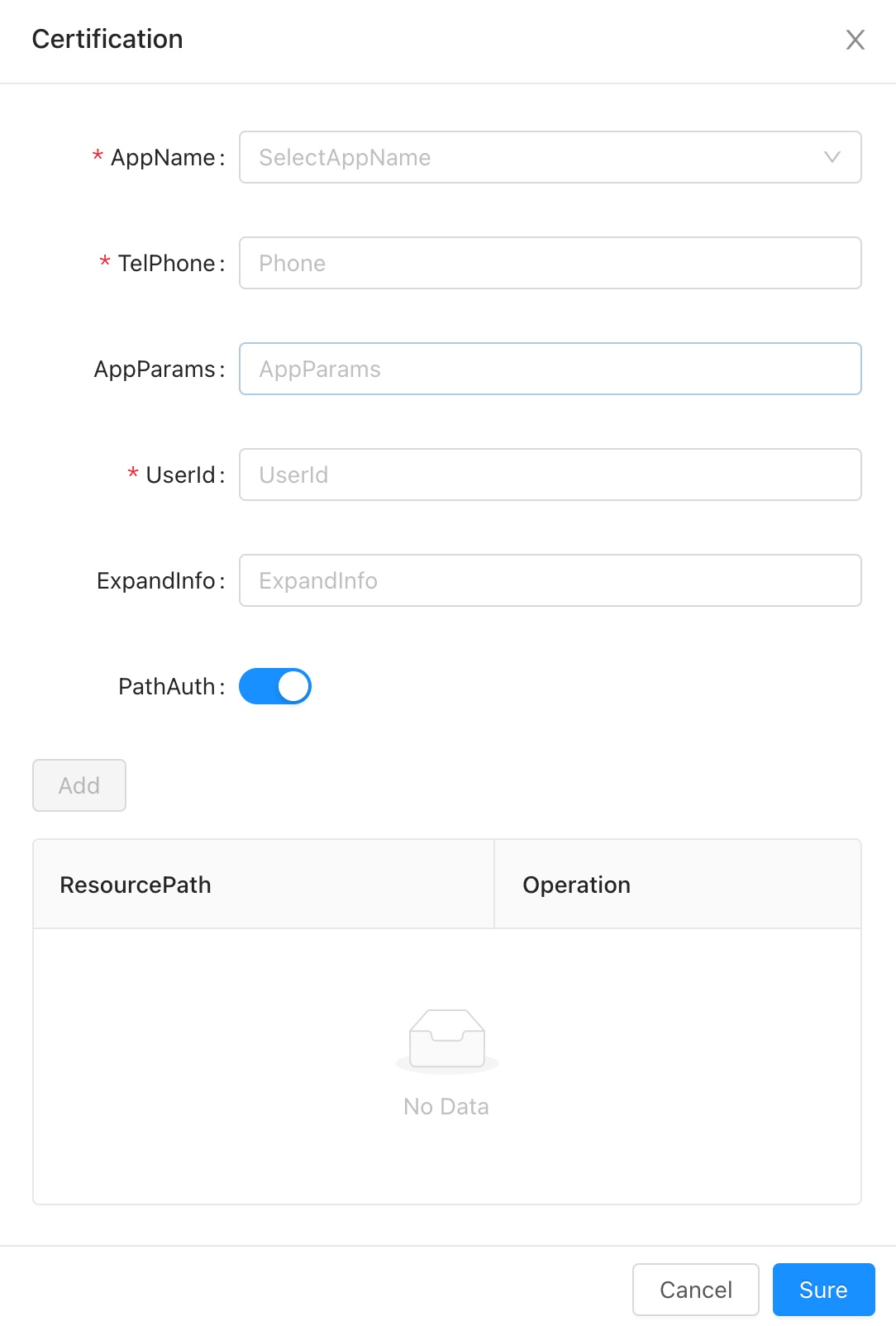
- AppName:The application name associated with this account, it can can fill in or choose (data comes from the application name configured in the Metadata).
- TelPhone:Telphone information.
- AppParams:When the requested context path is the same as the AppName,add this value to the header, the key is
appParam. - UserId:Give the user a name, just as an information record.
- ExpandInfo:Description of the account.
- PathAuth:After opening, the account only allows access to the resource path configured below.
- ResourcePath:Allow access to the resource path, support path matching,e.g.
/order/**.
After submit, a piece of authentication information is generated, which contains AppKey and AppSecret, which is the AK/SK in the Sign plugin.
Please refer to the detailed instructions of the Sign plugin: Sign Plugin.
2.4.1.3 PathOperation
For the created authentication information, you can click PathOperation at the end of a piece of authentication information.
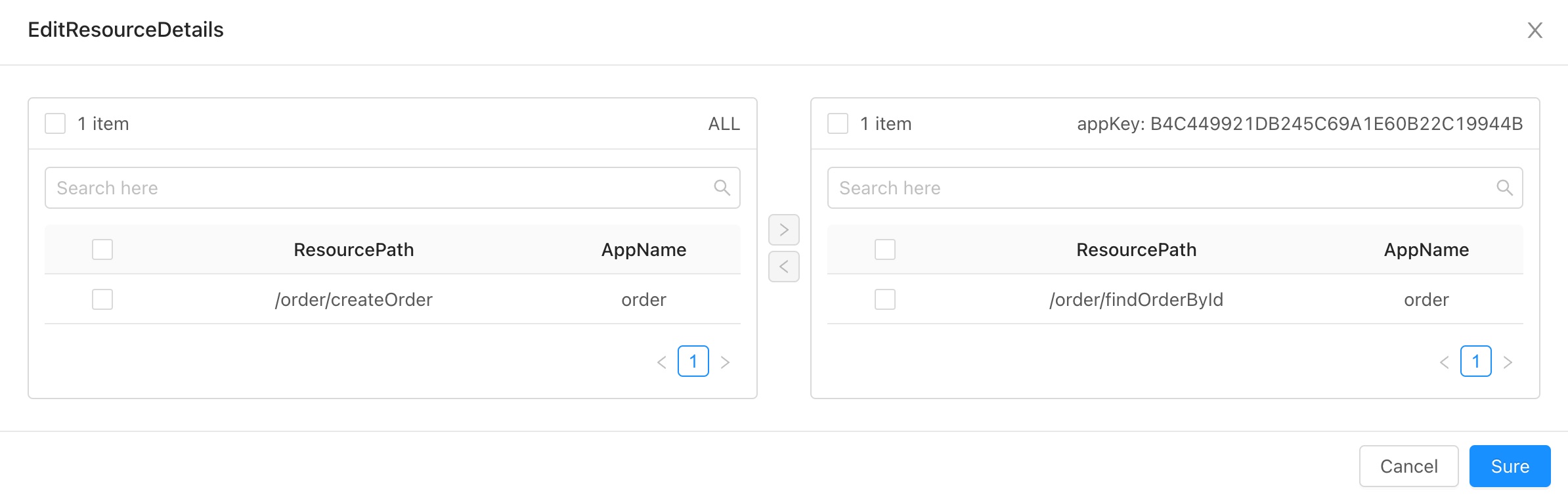
- On the left is a list of configurable paths, and on the right is a list of paths that allow the account to access.
- Check the resource path, click the
>or<in the middle to move the checked data to the corresponding list. - In the list of configurable paths on the left, click "Editor" at the end of the account information line, and add them in the "Resource Path" in the pop-up box.
2.4.2 Implementation of Gateway Technology
- Adopt
AK/SKauthentication technical scheme. - Adopt authentication plug-in and Chain of Responsibility Pattern to realize.
- Take effect when the authentication plugin is enabled and all interfaces are configured for authentication.
2.4.3 Authentication Guide
-
Step 1:
AK/SKis assigned by the gateway. For example, theAKassigned to you is:1TEST123456781SK is: ` 506eeb535cf740d7a755cb49f4a1536' -
Step 2: Decide the gateway path you want to access, such as
/api/service/abc -
Step 3: Construct parameters (the following are general parameters)
| Field | Value | Description |
|---|---|---|
| timestamp | current timestamp(String) | The number of milliseconds of the current time(gateway will filter requests the before 5 minutes) |
| path | /api/service/abc | The path that you want to request(Modify by yourself according to your configuration of gateway) |
| version | 1.0.0 | 1.0.0 is a fixed string value |
Sort the above three field natually according to the key, then splice fields and fields, finally splice SK. The following is a code example.
2.4.3.1 Generate sign with request header
Step 1: First, construct a Map.
   Map<String, String> map = Maps.newHashMapWithExpectedSize(3);
   //timestamp is string format of millisecond. String.valueOf(LocalDateTime.now().toInstant(ZoneOffset.of("+8")).toEpochMilli())
   map.put("timestamp","1571711067186");  // Value should be string format of milliseconds
   map.put("path", "/api/service/abc");
   map.put("version", "1.0.0");
Step 2: Sort the Keys naturally, then splice the key and values, and finally splice the SK assigned to you.
List<String> storedKeys = Arrays.stream(map.keySet()
                .toArray(new String[]{}))
                .sorted(Comparator.naturalOrder())
                .collect(Collectors.toList());
final String sign = storedKeys.stream()
                .map(key -> String.join("", key, map.get(key)))
                .collect(Collectors.joining()).trim()
                .concat("506EEB535CF740D7A755CB4B9F4A1536");
- The returned sign value should be:
path/api/service/abctimestamp1571711067186version1.0.0506EEB535CF740D7A755CB4B9F4A1536
Step 3: Md5 encryption and then capitalization.
DigestUtils.md5DigestAsHex(sign.getBytes()).toUpperCase()
- The final returned value is:
A021BF82BE342668B78CD9ADE593D683.
2.4.3.2 Generate sign with request header and request body
Step 1: First, construct a Map, and the map must save every request body parameters
   Map<String, String> map = Maps.newHashMapWithExpectedSize(3);
   //timestamp is string format of millisecond. String.valueOf(LocalDateTime.now().toInstant(ZoneOffset.of("+8")).toEpochMilli())
   map.put("timestamp","1660659201000");  // Value should be string format of milliseconds
   map.put("path", "/http/order/save");
   map.put("version", "1.0.0");
   // if your request body is:{"id":123,"name":"order"}
   map.put("id", "1");
   map.put("name", "order")
Step 2: Sort the Keys naturally, then splice the key and values, and finally splice the SK assigned to you.
List<String> storedKeys = Arrays.stream(map.keySet()
                .toArray(new String[]{}))
                .sorted(Comparator.naturalOrder())
                .collect(Collectors.toList());
final String sign = storedKeys.stream()
                .map(key -> String.join("", key, map.get(key)))
                .collect(Collectors.joining()).trim()
                .concat("2D47C325AE5B4A4C926C23FD4395C719");
- The returned sign value should be:
id123nameorderpath/http/order/savetimestamp1660659201000version1.0.02D47C325AE5B4A4C926C23FD4395C719
Step 3: Md5 encryption and then capitalization.
DigestUtils.md5DigestAsHex(sign.getBytes()).toUpperCase()
- The final returned value is:
35FE61C21F73E9AAFC46954C14F299D7.
2.4.4 Request GateWay
-
If your visited path is:
/api/service/abc. -
Address: http: domain name of gateway
/api/service/abc. -
Set
header,headerParameter:
| Field | Value | Description |
|---|---|---|
| timestamp | 1571711067186 | Timestamp when signing |
| appKey | 1TEST123456781 | The AK value assigned to you |
| sign | A90E66763793BDBC817CF3B52AAAC041 | The signature obtained above |
| version | 1.0.0 | 1.0.0 is a fixed value. |
-
The signature plugin will filter requests before
5minutes by default -
If the authentication fails, will return code
401, message may change.
{
  "code": 401,
  "message": "sign is not pass,Please check you sign algorithm!",
  "data": null
}
2.4.5 Plugin Config
2.4.6 Selector Config
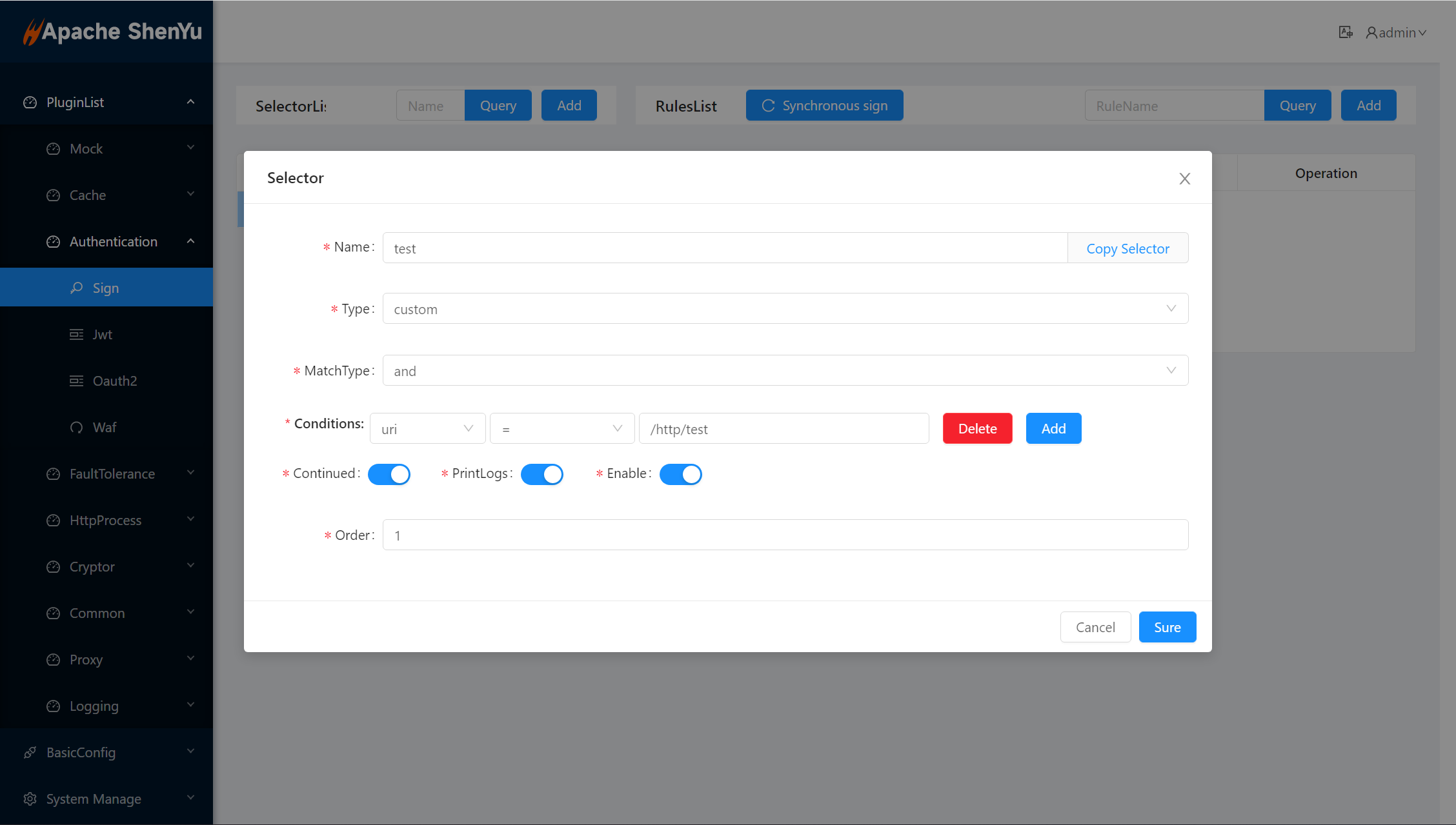
-
Only those matched requests can be authenticated by signature.
-
Selectors and rules, please refer to: Selector And Rule Config
2.4.7 Rule Config
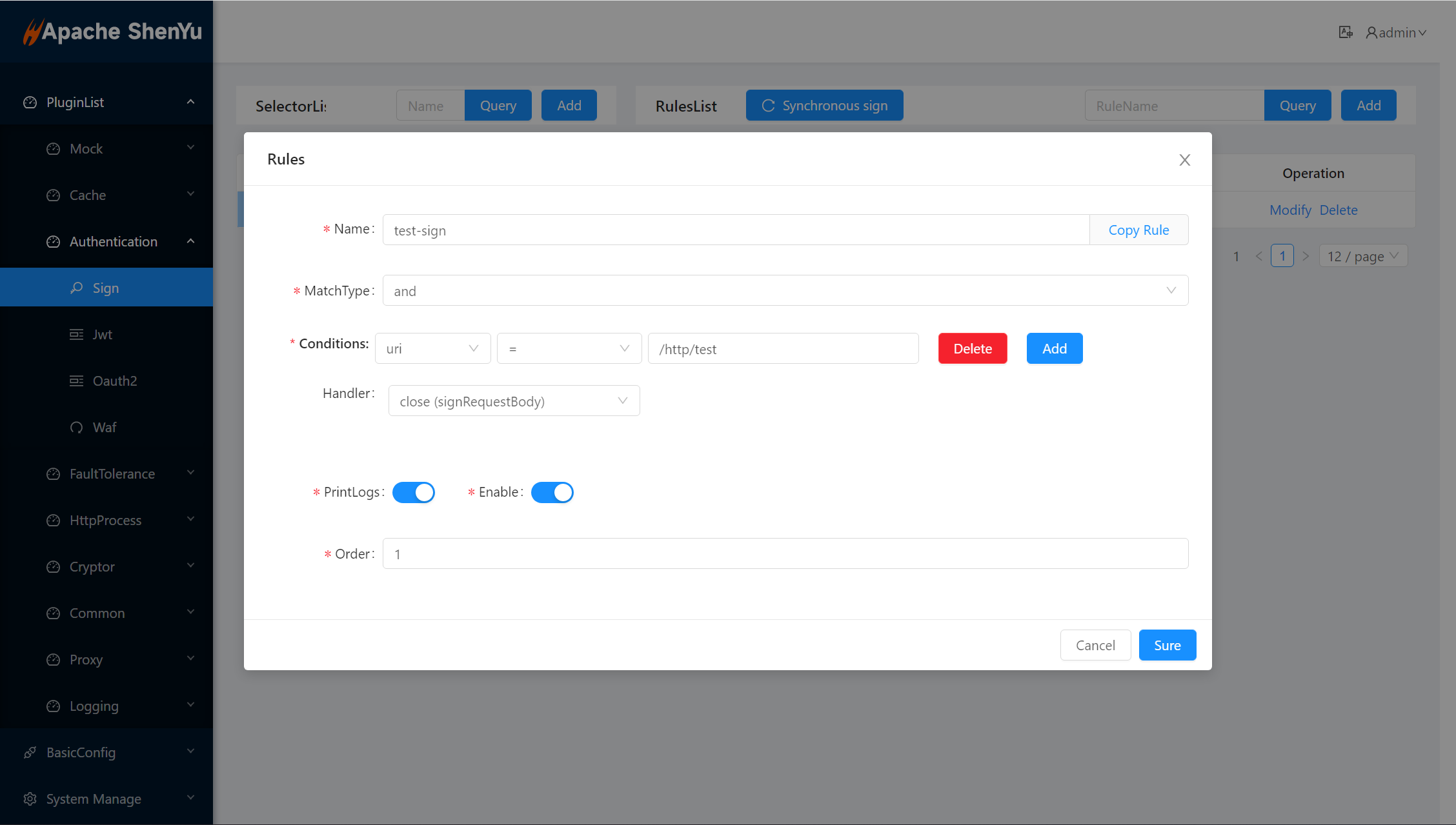
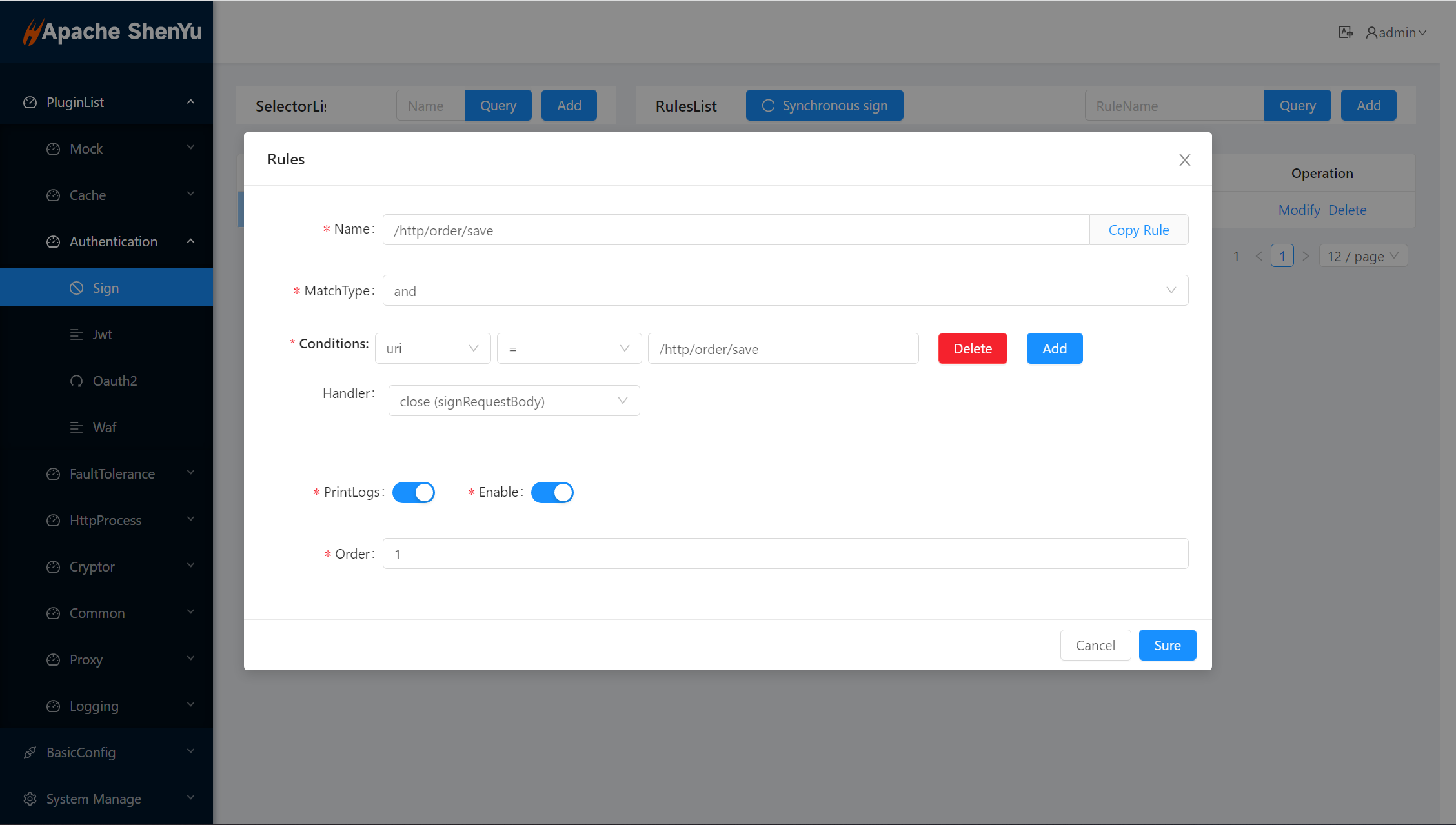
- close(signRequestBody): generate signature with request header.
- open(signRequestBody): generate signature with request header and request body.
2.5 Config Plugin With Authorize(2.0.0)
This authentication algorithm is the version 2.0.0 algorithm, which is same as version1's except Authentication Guide and Request GateWay.
2.5.1 Authentication Guide
Authentication algorithm of Version 2.0.0 generates a Token based on the signature algorithm, and puts the Token value into the request header ShenYu-Authorization parameter when sending a request. To distinguish it from version 1.0.0, the version parameter of the request header is left, which is 2.0.0.
2.5.1.1 prepare
-
Step 1:
AK/SKis assigned by the gateway. For example, theAKassigned to you is:1TEST123456781SK is: ` 506eeb535cf740d7a755cb49f4a1536' -
Step 2: Decide the gateway path you want to access, such as
/api/service/abc
2.5.1.2 Generate Token
-
build parameter
build the
parametersthat is json string{"alg":"MD5","appKey":"506EEB535CF740D7A755CB4B9F4A1536","timestamp":"1571711067186"}alg: signature algorithm(result is uppercase HEX string)
- MD5: MD5-HASH(data+key)
- HMD5:HMAC-MD5
- HS256:HMAC-SHA-256
- HS512:HMAC-SHA-512
appKey:appKey
timestamp: timestamp of the length is 13
-
Calculate signature value
signature = sign(base64Encoding(parameters) + Relative URL + Body*,secret);* indicate Optional , it depends on handler configRelative URL = path [ "?" query ] eg: /apache/shenyu/pulls?name=jacknote :
Relative URLis not include fragment -
Calculate Token
token = base64Encoding(parameters) + '.' + base64Encoding(signature)
Put the Token into the request header
ShenYu-Authorizationparameter.
2.5.2 Request GateWay
| Field | 值 | 描述 |
|---|---|---|
| ShenYu-Authorization | Token | Token |
| version | 2.0.0 | Fixed value |
please change the Authorization field to ShenYu-Authorization as soon as possible to avoid conflicts with application Authorization.
2.6 Examples
2.6.1 Verify api with sign plugin(1.0.0)
2.6.1.1 Plugin Config
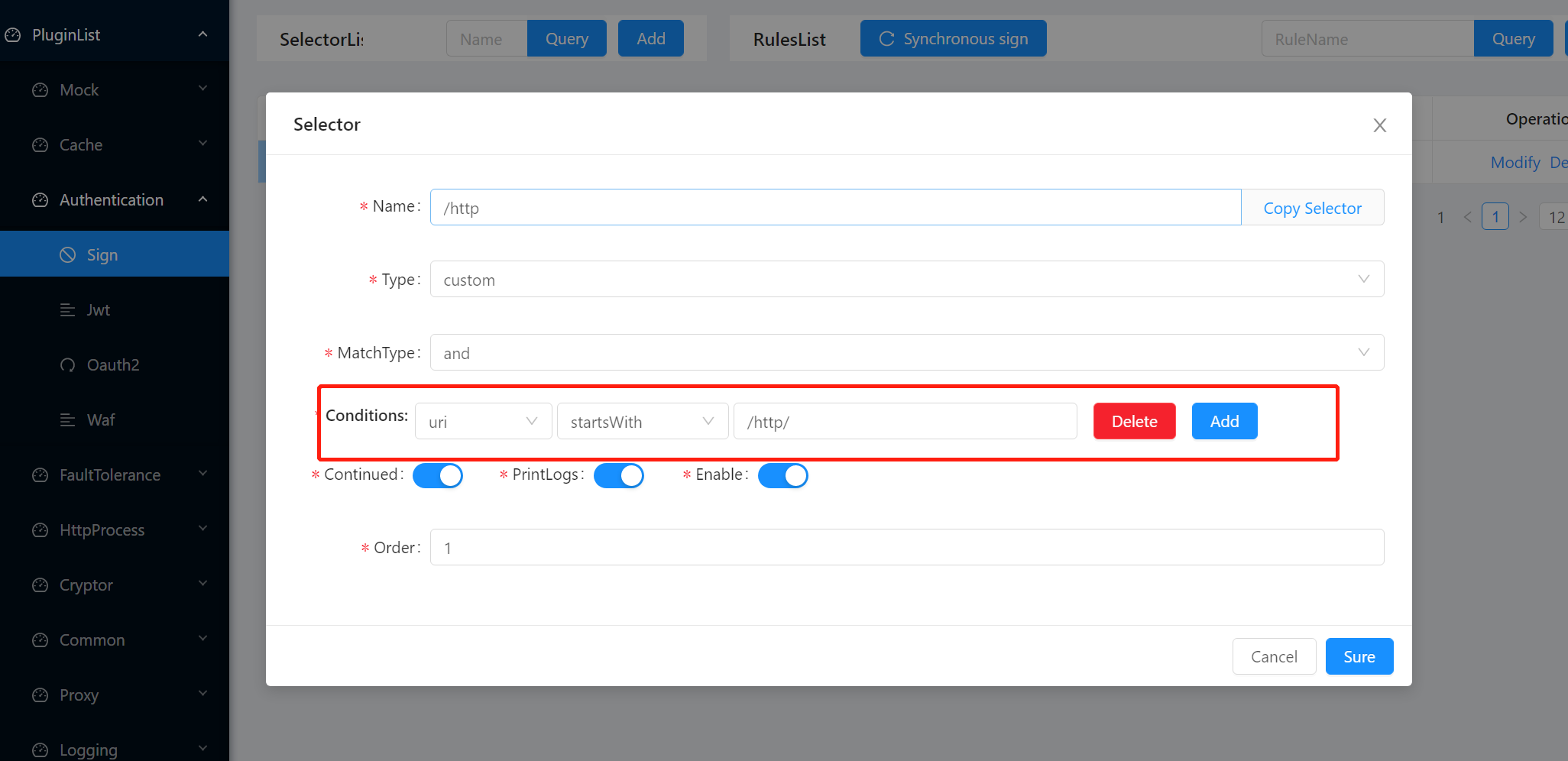
2.6.1.2 Selector Config
2.6.1.3 Rule Config
2.6.1.4 Add AppKey/SecretKey
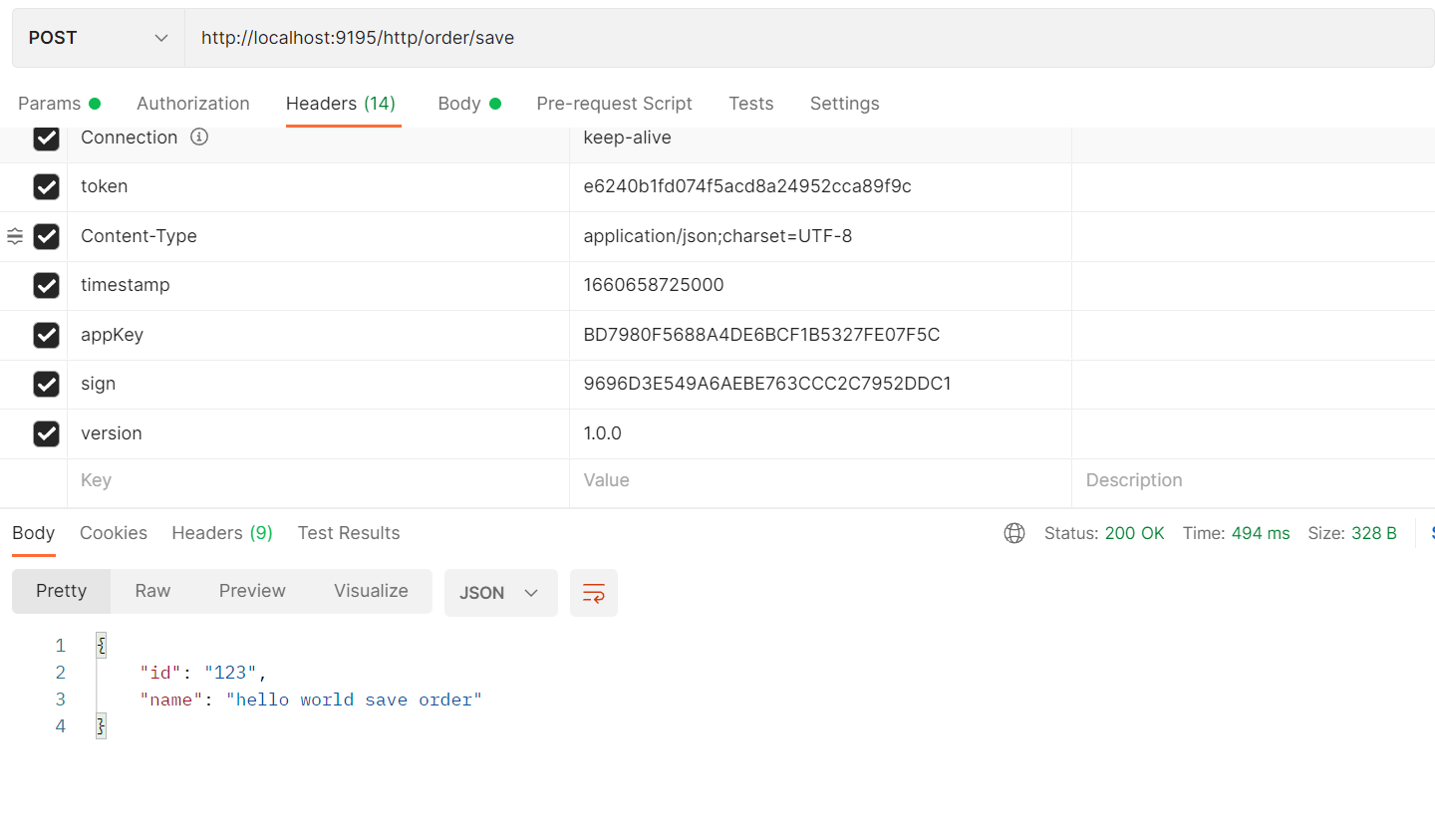
2.6.1.5 Request Service and check result
- build request params with
Authentication Guide,
public class Test1 {
  public static void main(String[] args) {
    Map<String, String> map = Maps.newHashMapWithExpectedSize(3);
    //timestamp为毫秒数的字符串形式 String.valueOf(LocalDateTime.now().toInstant(ZoneOffset.of("+8")).toEpochMilli())
    map.put("timestamp","1660658725000");  //值应该为毫秒数的字符串形式
    map.put("path", "/http/order/save");
    map.put("version", "1.0.0");
    map.put("id", "123");
    map.put("name", "order");
    // map.put("body", "{\"id\":123,\"name\":\"order\"}");

    List<String> storedKeys = Arrays.stream(map.keySet()
                    .toArray(new String[]{}))
            .sorted(Comparator.naturalOrder())
            .collect(Collectors.toList());
    final String sign = storedKeys.stream()
            .map(key -> String.join("", key, map.get(key)))
            .collect(Collectors.joining()).trim()
            .concat("2D47C325AE5B4A4C926C23FD4395C719");
    System.out.println(sign);

    System.out.println(DigestUtils.md5DigestAsHex(sign.getBytes()).toUpperCase());
  }
}
- signature without body:
path/http/order/savetimestamp1571711067186version1.0.02D47C325AE5B4A4C926C23FD4395C719 - sign without body result is:
9696D3E549A6AEBE763CCC2C7952DDC1
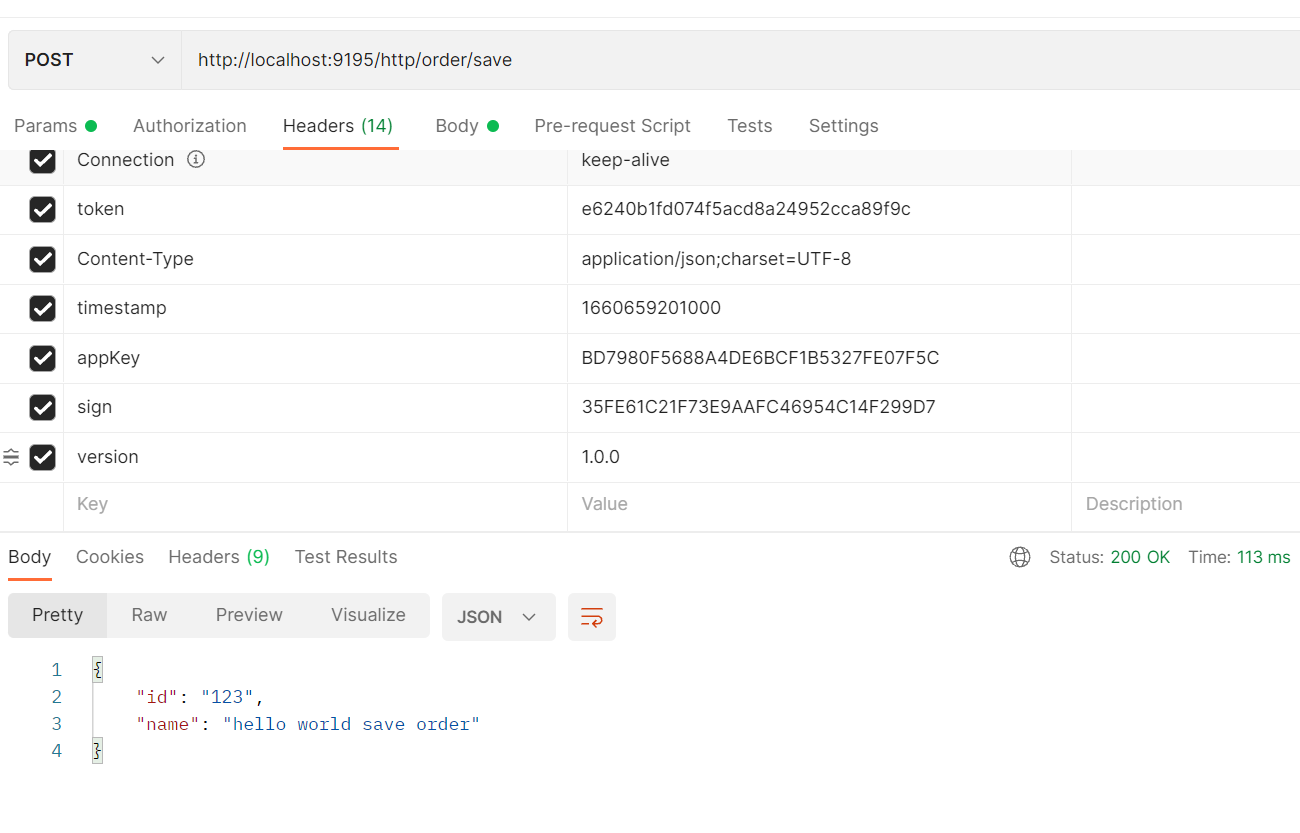
public class Test2 {
  public static void main(String[] args) {
    Map<String, String> map = Maps.newHashMapWithExpectedSize(3);
    //timestamp为毫秒数的字符串形式 String.valueOf(LocalDateTime.now().toInstant(ZoneOffset.of("+8")).toEpochMilli())
    map.put("timestamp","1660659201000");  //值应该为毫秒数的字符串形式
    map.put("path", "/http/order/save");
    map.put("version", "1.0.0");

    List<String> storedKeys = Arrays.stream(map.keySet()
                    .toArray(new String[]{}))
            .sorted(Comparator.naturalOrder())
            .collect(Collectors.toList());
    final String sign = storedKeys.stream()
            .map(key -> String.join("", key, map.get(key)))
            .collect(Collectors.joining()).trim()
            .concat("2D47C325AE5B4A4C926C23FD4395C719");
    System.out.println(sign);

    System.out.println(DigestUtils.md5DigestAsHex(sign.getBytes()).toUpperCase());
  }
}
*signature with body:id123nameorderpath/http/order/savetimestamp1660659201000version1.0.02D47C325AE5B4A4C926C23FD4395C719
*sign with body result is:35FE61C21F73E9AAFC46954C14F299D7
2.6.2 Verify api with sign plugin(2.0.0)
All the configuration parts are the same, so let's look directly at the the calculation part of parameter of request header and the part of sending request.
2.6.2.1 Request Service and check result
-
implements the algorithm
Suppose we use a signature algorithm named MD5. According to the previous description, the signature value is to concatenate the data and key, and then hash.
private static String sign(final String signKey, final String base64Parameters, final URI uri, final String body) {String data = base64Parameters+ getRelativeURL(uri)+ Optional.ofNullable(body).orElse("");return DigestUtils.md5Hex(data+signKey).toUpperCase();}private static String getRelativeURL(final URI uri) {if (Objects.isNull(uri.getQuery())) {return uri.getPath();}return uri.getPath() + "?" + uri.getQuery();} -
verify without the request body
public static void main(String[] args) {String appSecret = "2D47C325AE5B4A4C926C23FD4395C719";URI uri = URI.create("/http/order/save");String parameters = JsonUtils.toJson(ImmutableMap.of("alg","MD5","appKey","BD7980F5688A4DE6BCF1B5327FE07F5C","timestamp","1673708353996"));String base64Parameters = Base64.getEncoder().encodeToString(parameters.getBytes(StandardCharsets.UTF_8));String signature = sign(appSecret,base64Parameters,uri,null);String Token = base64Parameters+"."+signature;System.out.println(Token);}Token:
eyJhbGciOiJNRDUiLCJhcHBLZXkiOiJCRDc5ODBGNTY4OEE0REU2QkNGMUI1MzI3RkUwN0Y1QyIsInRpbWVzdGFtcCI6IjE2NzM3MDgzNTM5OTYifQ==.33ED53DF79CA5B53C0BF2448B670AF35发送请求:
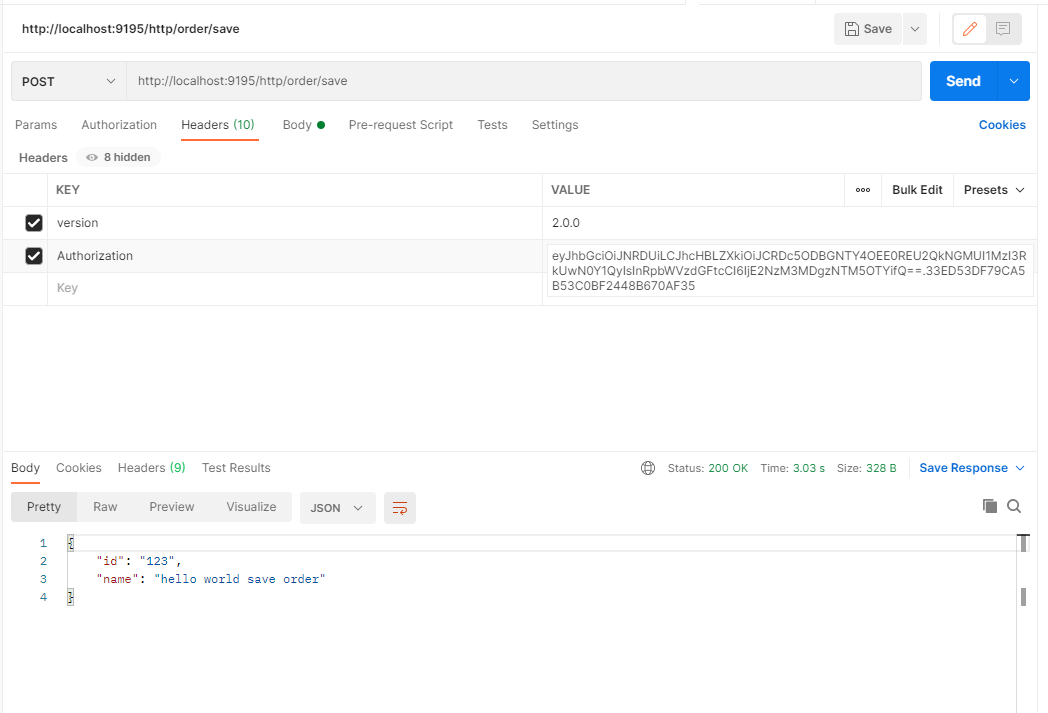
-
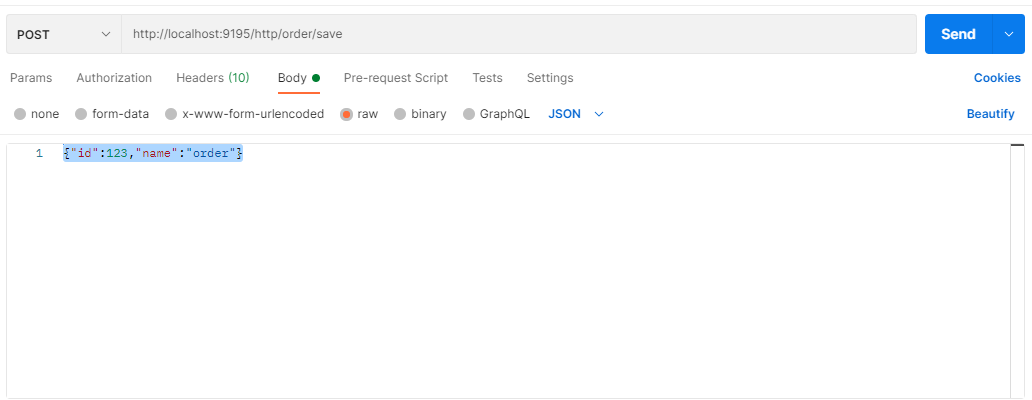
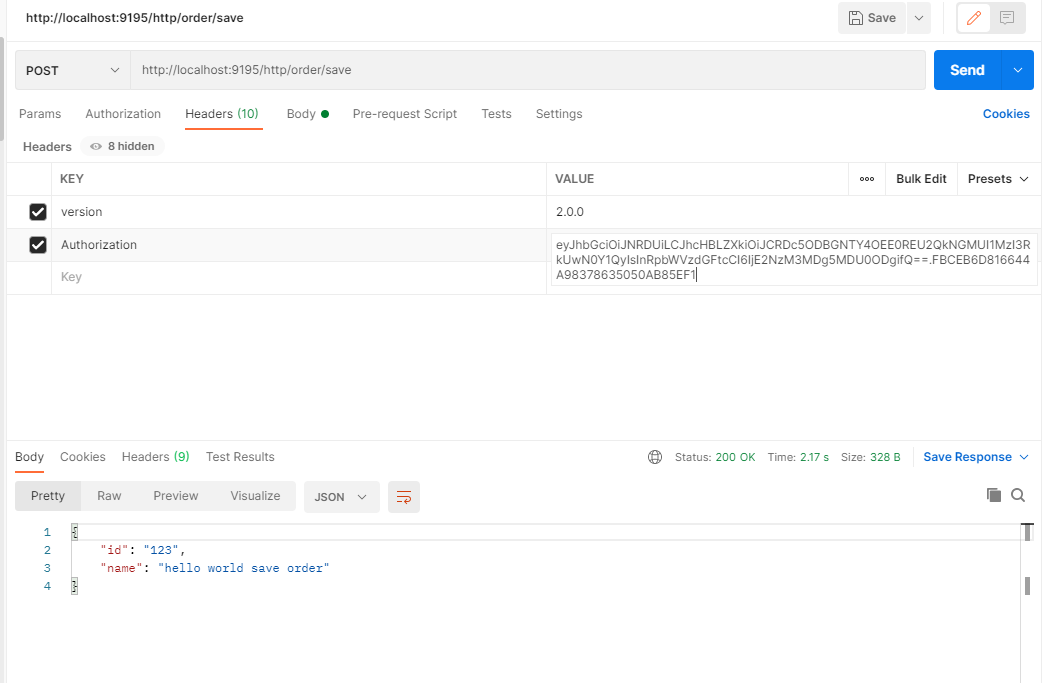
verify with the request body
    public static void main(String[] args) {
        String appSecret = "2D47C325AE5B4A4C926C23FD4395C719";

        URI uri = URI.create("/http/order/save");

        String parameters = JsonUtils.toJson(ImmutableMap.of(
                "alg","MD5",
                "appKey","BD7980F5688A4DE6BCF1B5327FE07F5C",
                "timestamp","1673708905488"));

        String base64Parameters = Base64.getEncoder()
                .encodeToString(parameters.getBytes(StandardCharsets.UTF_8));

        String requestBody = "{\"id\":123,\"name\":\"order\"}";

        String signature = sign(appSecret,base64Parameters,uri,requestBody);

        String Token = base64Parameters+"."+signature;

        System.out.println(Token);

    }
Token:
eyJhbGciOiJNRDUiLCJhcHBLZXkiOiJCRDc5ODBGNTY4OEE0REU2QkNGMUI1MzI3RkUwN0Y1QyIsInRpbWVzdGFtcCI6IjE2NzM3MDg5MDU0ODgifQ==.FBCEB6D816644A98378635050AB85EF1
3. How to disable plugin
- In
shenyu-admin--> BasicConfig --> Plugin -->signset to disabled.
4. Extension
- Please refer to: dev-sign.